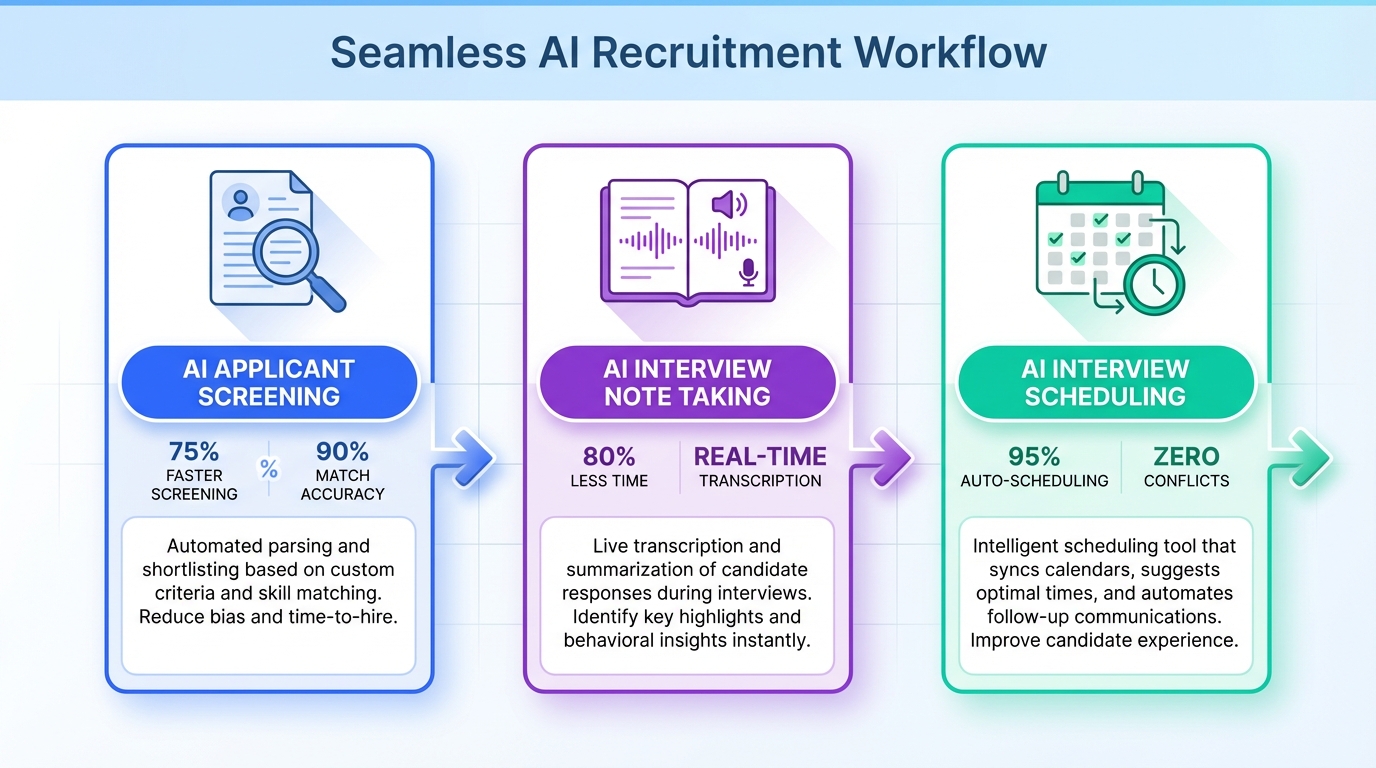
If you are evaluating an ats recruitment tool in 2026, the most practical benchmark is whether your ATS consistently delivers three AI workflows recruiters actually feel every week: AI applicant screening, AI interview note taking, and AI interview scheduling. We have been seeing ATS vendors accelerate feature releases, which is good news because it can expand what your core system covers and reduce tool sprawl. This article explains how to assess those capabilities across different types of ats, what to watch for in an applicant tracking system for technology hiring, and how StrategyBrain AI Recruiter can complement your ATS by automating LinkedIn outreach and multilingual candidate conversations so your team spends more time on final qualification and interviews.
Why ATS AI features are moving fast
The most noticeable impact of AI in Talent Acquisition has been the speed of feature development inside ATS products. If you run an ATS today, you have likely seen a steady stream of release announcements that expand what the system can do beyond classic requisition management and pipeline tracking.
That expansion matters because it changes the buying decision. Instead of adding a separate tool for every workflow, teams can sometimes consolidate back into the ATS if the new features are reliable, auditable, and adopted by recruiters.
This guide stays focused on the three AI capabilities that show up most often in real recruiting operations. It does not attempt to rank vendors or claim that every ATS implements these features the same way.
The 3 AI capabilities to audit in your ATS
1) AI applicant screening
AI applicant screening is the use of machine learning or rules plus AI to help prioritize applicants, highlight likely matches, and reduce manual résumé review time. In practice, recruiters care less about the label and more about whether the system produces a shortlist they can trust.
- What to verify: Does it explain why a candidate is recommended, using job requirements and résumé evidence?
- What “good” looks like: Recruiters can reproduce the logic and adjust criteria without breaking the workflow.
- What to be cautious about: Black box scores with no explanation, or screening that cannot be audited for fairness.
2) AI interview note taking
AI interview note taking typically means transcribing an interview and generating structured notes, summaries, and action items. The value is consistency and speed, but only if the output is accurate and easy to review.
- What to verify: Can interviewers edit notes, attribute comments to the right person, and store them in the candidate record?
- What “good” looks like: Notes are formatted in a way your hiring team actually uses, such as competencies, risks, and next steps.
- What to be cautious about: Summaries that sound confident but miss key details, especially for technical interviews.
3) AI interview scheduling
AI interview scheduling is automation that coordinates calendars, proposes time slots, and confirms interviews with candidates and interviewers. It can remove a lot of back and forth, but it must handle edge cases.
- What to verify: Does it support time zones, rescheduling, and interviewer changes without losing context?
- What “good” looks like: The system reduces coordination work while keeping a clear audit trail of confirmations and changes.
- What to be cautious about: Automation that fails silently and creates candidate frustration.
A simple maturity checklist you can run this week
When we audit an ATS recruitment tool internally, we try to avoid vendor marketing language and focus on observable behavior. Here is a checklist you can run with one open role and a small sample of candidates.
Step by step audit
- Pick one active requisition with a clear scorecard and at least 20 applicants so you can see screening behavior.
- Test AI screening outputs by comparing the top 10 recommended candidates to your scorecard and checking whether the system explains its reasoning.
- Run one interview note workflow with a real interview and confirm the notes are editable, attributable, and stored in the candidate record.
- Schedule one panel interview across at least 2 time zones and force a reschedule to see whether the automation handles changes cleanly.
- Collect recruiter feedback in writing: what saved time, what created rework, and what was ignored.
What we look for (practical signals)
- Adoption: Recruiters use it without being forced.
- Explainability: The system shows why it made a recommendation.
- Workflow fit: It reduces steps instead of adding review overhead.
- Auditability: You can trace what happened and when.
How this looks across types of ATS
Not all ATS products are built for the same environment. Thinking in terms of types of ats helps you set realistic expectations for AI features and integrations.
- SMB ATS: Often moves fast on new features, but may have lighter governance and fewer enterprise controls.
- Enterprise ATS: Typically stronger on permissions, compliance workflows, and reporting, but feature rollouts can be slower to reach all customers.
- ATS plus suite platforms: May bundle scheduling, CRM, and analytics, which can simplify procurement but can also limit flexibility.
The right question is not “does it have AI,” but “does the AI feature reduce recruiter workload without creating risk or rework.”
Where an applicant tracking system for technology often breaks
An applicant tracking system for technology hiring is frequently stressed by high volume inbound applicants, specialized skill evaluation, and fast moving hiring managers. Even when AI features exist, teams hit predictable friction points.
- Technical signal quality: Screening can over index on keywords and underweight real evidence such as project scope or impact.
- Interview complexity: Panel interviews and multi stage loops create scheduling edge cases that basic automation cannot handle.
- Candidate experience: Slow follow up and inconsistent messaging can lose strong candidates, especially in competitive markets.
This is where many teams add complementary automation outside the ATS, as long as it does not create data fragmentation.
Where StrategyBrain AI Recruiter fits with an ATS
Even if your ATS recruitment tool is improving quickly, it may not cover the full top of funnel workflow, especially on LinkedIn. StrategyBrain AI Recruiter is designed to automate the repetitive LinkedIn steps that typically sit before the ATS stage, while keeping recruiters in control of final qualification.
What it automates on LinkedIn
- Candidate outreach and follow up: Automatically connects with candidates that match your search criteria and introduces the role.
- Two way Q and A: Answers candidate questions about the role, company, and compensation using the information you provide.
- Interest confirmation: Confirms whether the candidate wants to interview and captures intent clearly.
- Résumé and contact capture: Collects résumés and contact details from interested candidates so recruiters can proceed with screening and interviews.
Why teams use it alongside an ATS
In our experience, the ATS is strongest once a candidate is in process. The bottleneck is often the manual outreach and early conversation management. AI Recruiter helps by providing 24/7 multilingual communication and consistent follow up, which can reduce delays and keep candidates engaged before they enter the ATS pipeline.
Scope boundary and an honest limitation
AI Recruiter can identify willingness to communicate or interview, but it does not decide whether a résumé fully matches job requirements. Recruiters still make the final qualification decision after reviewing the résumé, which is important for quality control.
Common gaps and workarounds
When ATS AI features are present but not fully mature, teams usually do one of three things. Each option has tradeoffs.
- Keep the ATS as system of record: Use the ATS for compliance and reporting, and add targeted automation only where it clearly reduces workload.
- Consolidate tools: If the ATS now covers screening, notes, and scheduling well enough, retire overlapping point solutions to reduce complexity.
- Split responsibilities by workflow stage: Use a specialized tool for top of funnel engagement, then move qualified candidates into the ATS for interviews and offers.
If you choose the split approach, define a simple handoff rule, such as “candidate enters ATS only after interest is confirmed and a résumé is received,” so your pipeline stays clean.
FAQ
What is an ATS recruitment tool?
An ATS recruitment tool is software that manages job requisitions and candidate pipelines, including applications, interview stages, and hiring decisions. Many ATS platforms now add AI features to reduce manual work in screening, interview documentation, and scheduling.
Which AI features should I check first in my ATS?
Start with AI applicant screening, AI interview note taking, and AI interview scheduling because they map to high effort recruiter tasks. Verify that each feature is explainable, adopted by recruiters, and does not create rework.
Are there different types of ATS that affect AI feature maturity?
Yes. Different types of ATS, such as SMB, enterprise, and suite platforms, often prioritize different capabilities. Your best indicator is not the category but whether the feature works reliably in your workflow and governance requirements.
What is unique about an applicant tracking system for technology hiring?
An applicant tracking system for technology roles is often stressed by specialized skill evaluation and complex interview loops. Screening and interview note summaries can be less reliable if they over rely on keywords or miss technical nuance.
Does StrategyBrain AI Recruiter replace an ATS?
No. StrategyBrain AI Recruiter is designed to complement an ATS by automating LinkedIn outreach, follow up, and early candidate conversations. The ATS remains the system of record for interviews, offers, and hiring decisions.
Can AI Recruiter communicate with candidates in multiple languages?
Yes. AI Recruiter supports multilingual candidate communication and can respond 24/7, which helps global hiring teams reduce delays across time zones.
Does AI Recruiter decide if a candidate is qualified?
No. AI Recruiter confirms interest and collects résumés and contact details, but recruiters still perform final qualification by reviewing the résumé against job requirements.
How should I run an internal ATS audit without overcomplicating it?
Use one active role and test the three AI workflows end to end with real recruiter feedback. Focus on adoption, explainability, workflow fit, and auditability rather than feature checklists.
Conclusion
The state of your ATS recruitment tool in 2026 can be assessed quickly by auditing three AI workflows: applicant screening, interview note taking, and interview scheduling. If those features are reliable and adopted, you may be able to consolidate tools. If they are present but inconsistent, a complementary approach often works better.
Next step: run the maturity checklist on one active role this week, document where the workflow breaks, and decide whether you need ATS improvements, consolidation, or a top of funnel automation layer. If LinkedIn outreach and follow up is your bottleneck, StrategyBrain AI Recruiter can handle the repetitive engagement and résumé collection so your team can focus on final qualification and interviews.