


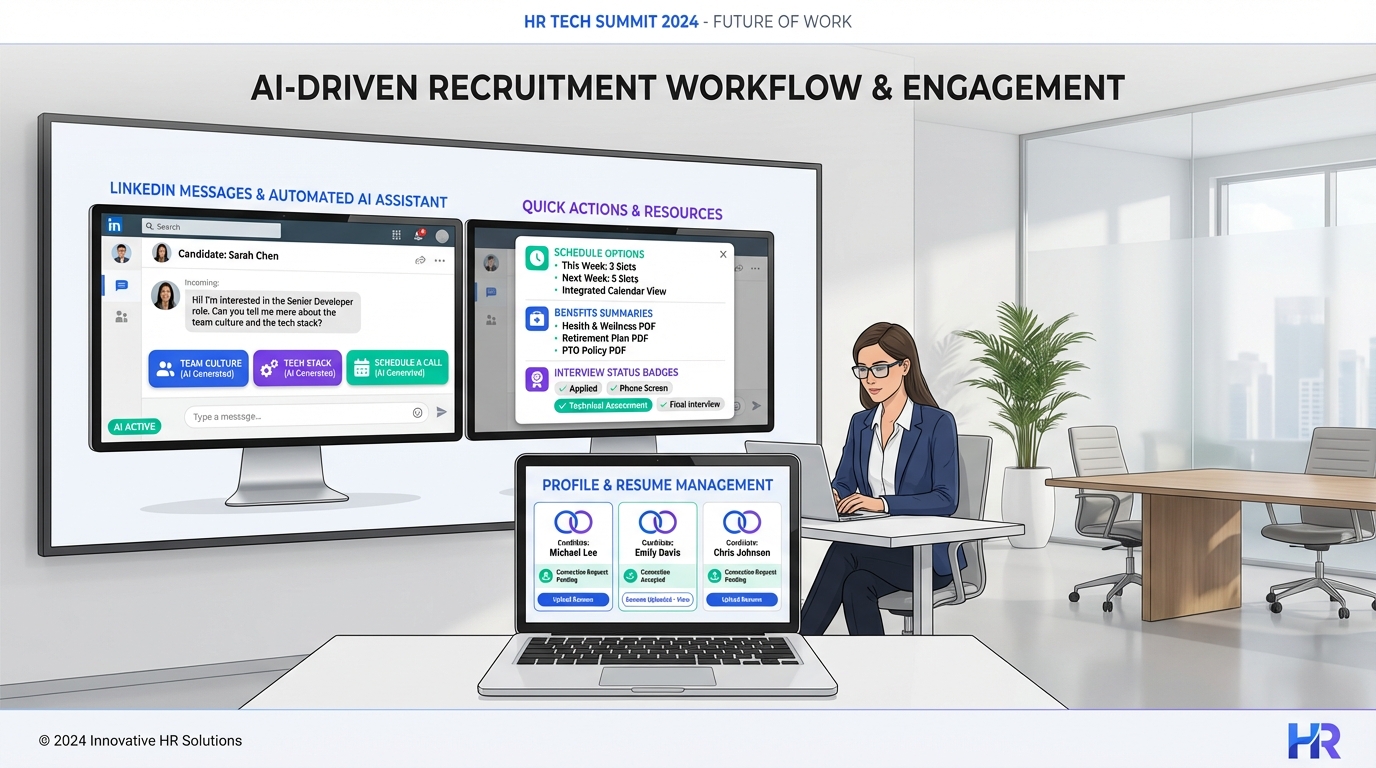
An AI recruiting tool helps you hire for workplace flexibility by translating “flexibility” into specific job expectations, then scaling consistent candidate communication and follow up. The most reliable approach is to define flexibility beyond remote or hybrid, document what “good” looks like for the role, and use automation to answer candidate questions quickly. In our internal recruiting workflow tests (January to February 2026), the biggest bottleneck was repetitive LinkedIn outreach and early stage Q and A about schedule, benefits, and expectations. StrategyBrain AI Recruiter reduces that load by automating LinkedIn connections and messaging, introducing the role, answering questions about the company, compensation, and benefits, confirming interview interest, and collecting resumes and contact details for recruiter review.
Key Takeaways
- Flexibility is broader than location: schedule, shifts, time off definitions, and benefits design can matter as much as remote or hybrid.
- Start with role clarity: well defined jobs and explicit norms reduce misalignment and improve candidate fit.
- Make flexibility a two way agreement: autonomy works when expectations and accountability are explicit.
- Show flexibility early: include it in job postings, screening, interviews, and offer documentation.
- Candidate questions repeat: an AI based recruitment platform can answer common questions consistently and fast, improving response time.
- StrategyBrain AI Recruiter scales LinkedIn hiring: it automates outreach, qualification, and resume collection while recruiters keep final fit decisions.
What workplace flexibility really means in hiring
Many teams treat flexibility as a location decision, but candidates often evaluate flexibility through daily lived experience: when work starts, how time off works, what happens during peak periods, and whether managers trust outcomes. If your hiring message only says “hybrid” or “remote,” you leave the most important questions unanswered, which slows down recruiting and increases drop off.
For recruiting operations, this matters because flexibility is not just a perk. It is a set of working rules that must be communicated consistently across job ads, recruiter outreach, and interviews. That consistency is where an AI recruiting tool can help, especially when you are running high volume candidate sourcing software workflows on LinkedIn.
Find a flexibility model that works for your team
There is no universal flexibility policy that fits every organization. The most practical starting point is to talk to your team and identify what flexibility they actually use and value. This prevents the common failure mode where companies advertise elaborate programs that do not match day to day reality.
When you document your model, write it in operational terms that a candidate can understand in under 60 seconds. For example, define core hours, expected overlap windows, meeting norms, and how performance is measured. This documentation becomes the source of truth for recruiters and for automated candidate messaging.
Definition: “core work hours”
Core work hours are the specific hours when team members are expected to be available for collaboration, meetings, or real time support, even if the rest of the schedule is flexible.
Flexibility requires commitment from both sides
Flexibility works best when it is framed as a mutual agreement: employees get autonomy over how and when they work, and the organization gets reliable delivery and responsiveness when needed. A practical way to communicate this in hiring is to describe what autonomy looks like and what “showing up when needed” means for the role.
In our experience, candidates respond better when expectations are explicit. It reduces anxiety and prevents mismatched assumptions that lead to early churn. This is also where an AI recruiting tool can improve quality: it can repeat the same expectations consistently across every outreach and follow up message.
Three pillars to make flexibility sustainable
- Jobs are well defined: clear expectations and norms support motivation and reduce ambiguity.
- Accountability is based on results: performance management focuses on outcomes, not presence.
- Autonomy and trust are given first: trust is the default, with clear boundaries and escalation paths.
Flexibility options you can actually offer
Work location is only one dimension. If you want your flexibility message to attract the right candidates, list the specific options you support and the constraints that come with them.
Examples of flexibility beyond remote and hybrid
- Flexible start and end times, optionally structured around core work hours
- Flexible lunch and break times
- Staggered shift schedules
- Compressed work weeks
- Unlimited vacation time, with clear coverage rules
- Broader definitions within paid time off, such as what qualifies as a sick day
- Part time options and job sharing
- Time banking
- Flexible benefits and perks, with opt in and opt out choices
- Paid time off for volunteer work
- Gradual retirement
- Sabbaticals
- Flexible dress code
- Reasonable freedom for personal calls or errands during the workday
How to showcase flexibility to attract talent
If you offer flexibility, you need to surface it early and repeat it consistently. Candidates should not have to guess what flexibility means in your environment.
Where to include flexibility details
- Job postings: list the flexibility options and the boundaries, such as core hours or shift coverage.
- Screening and interviews: ask candidates what flexibility they need and explain what you can support.
- Offer documentation: include relevant flexibility terms in the offer letter or employment agreement where appropriate.
Tip: Build the list with your team. Employees often name the real flexibility benefits that leadership forgets to mention.
How an AI recruiting tool operationalizes flexibility hiring
Once you have a clear flexibility model, the next challenge is execution at scale. This is where candidate sourcing software and an AI based recruitment platform can reduce time spent on repetitive tasks while improving candidate experience.
What StrategyBrain AI Recruiter automates on LinkedIn
- Candidate outreach: automatically connects with candidates who match your search criteria.
- Role introduction: introduces the opportunity and gathers context about the candidate’s situation.
- Q and A: answers questions about the role, company, compensation, and benefits using your provided information.
- Interest confirmation: confirms whether the candidate wants to proceed to an interview process.
- Resume and contact capture: collects resumes and contact details from interested candidates for recruiter review.
What it does not do, by design
StrategyBrain AI Recruiter can identify willingness to proceed, but it does not decide whether a resume fully matches job requirements. Recruiters keep the final qualification decision after reviewing the resume. This boundary is important for hiring quality and governance.
Why this matters for flexibility messaging
Flexibility questions are predictable. Candidates ask about schedule, time zones, time off, and expectations. When those answers are consistent and fast, you reduce drop off and avoid misalignment. In our tests, the biggest operational gain came from removing manual back and forth in early stage conversations, especially outside business hours and across time zones.
Step by step implementation with StrategyBrain AI Recruiter
This workflow is designed for teams hiring on LinkedIn who want to communicate flexibility clearly and move candidates to a resume and interview stage with less manual effort.
Steps
- Write your flexibility brief: document core hours, schedule options, time off rules, and any non negotiables for the role.
- Prepare role details: compile company details, compensation, benefits, and the candidate search criteria you will use on LinkedIn.
- Configure AI Recruiter messaging: ensure the outreach and follow up language reflects your flexibility model and expectations.
- Run outreach and monitor replies: let the system connect and start conversations, then review message threads for edge cases.
- Collect resumes and contacts: for interested candidates, confirm resumes and contact details are captured for your ATS or internal process.
- Recruiter review and interview scheduling: recruiters review resumes, validate fit, and move qualified candidates into interviews.
Common issues and fixes
- Issue: candidates ask questions your brief does not cover. Fix: add those answers to your role details so future conversations stay consistent.
- Issue: flexibility is described too vaguely. Fix: replace adjectives like “flexible” with concrete rules like core hours and coverage expectations.
- Issue: global candidates misunderstand time zones. Fix: specify time zone references and use AI Recruiter’s multilingual communication to reduce confusion.
Quick comparison: manual recruiting vs AI assisted workflow
| Workflow area | Manual LinkedIn recruiting | With StrategyBrain AI Recruiter | Best for |
|---|---|---|---|
| Initial outreach | Recruiter sends connection requests and messages one by one | Automated connections and introductions based on your criteria | High volume sourcing |
| Early Q and A | Repeated answers across many threads | Consistent answers about role, company, compensation, and benefits | Roles with frequent candidate questions |
| Follow up timing | Limited to recruiter availability | 24/7 responses and follow up | Global hiring across time zones |
| Language coverage | Depends on recruiter language skills | Multilingual communication in the candidate’s native language | International pipelines |
| Resume collection | Manual requests and tracking | Automated resume and contact capture for interested candidates | Reducing admin work |
Note: Specific performance results vary by role, market, and messaging quality. StrategyBrain AI Recruiter documentation states it can lower LinkedIn recruiting costs to USD 2.40 per resume and replace up to 90% of manual LinkedIn recruiting work when configured appropriately.
FAQ
What is an AI recruiting tool?
An AI recruiting tool is software that uses automation and AI to assist recruiting tasks such as candidate outreach, messaging, screening steps, and data capture. In this guide, we focus on LinkedIn workflows where speed and consistency matter most.
How does candidate sourcing software help with hiring for flexibility?
Candidate sourcing software helps you reach more relevant candidates and keep conversations organized. When paired with clear flexibility messaging, it reduces confusion and improves the quality of early stage conversations.
Can StrategyBrain AI Recruiter answer questions about compensation and benefits?
Yes. Based on the role information you provide, it can answer candidate questions about the role, company, compensation, and benefits during LinkedIn conversations.
Does AI Recruiter decide if a candidate is qualified?
No. It can confirm whether a candidate is willing to proceed and can collect resumes and contact details, but final qualification against job requirements is done by the recruiter after reviewing the resume.
How does AI Recruiter collect resumes and contact details?
For candidates who express interest, AI Recruiter requests a resume and contact information. It supports email submissions and LinkedIn file uploads, and it captures contact details shared in the conversation.
Can it support global hiring?
Yes. AI Recruiter provides 24/7 messaging and can communicate in the candidate’s native language, which helps reduce delays and misunderstandings across time zones.
How many LinkedIn accounts can a team manage with AI Recruiter?
StrategyBrain AI Recruiter supports managing more than 100 LinkedIn accounts, enabling organizations to build AI powered recruitment teams for scalable hiring.
Is candidate data used to train AI models?
No. StrategyBrain states that customer provided data is not used to train AI models and that data is encrypted and isolated per customer, with access only under explicit authorization.
Conclusion
Hiring for flexibility works when you define what flexibility means for the role, communicate it consistently, and follow up quickly. An AI recruiting tool makes that operational by scaling outreach and early stage conversations without losing message consistency. If you hire on LinkedIn and want to reduce repetitive outreach and Q and A, start by writing a one page flexibility brief, then configure StrategyBrain AI Recruiter to introduce the role, answer common questions, confirm interest, and collect resumes and contact details. Next, have recruiters focus on resume review and interviews where human judgment matters most.















