


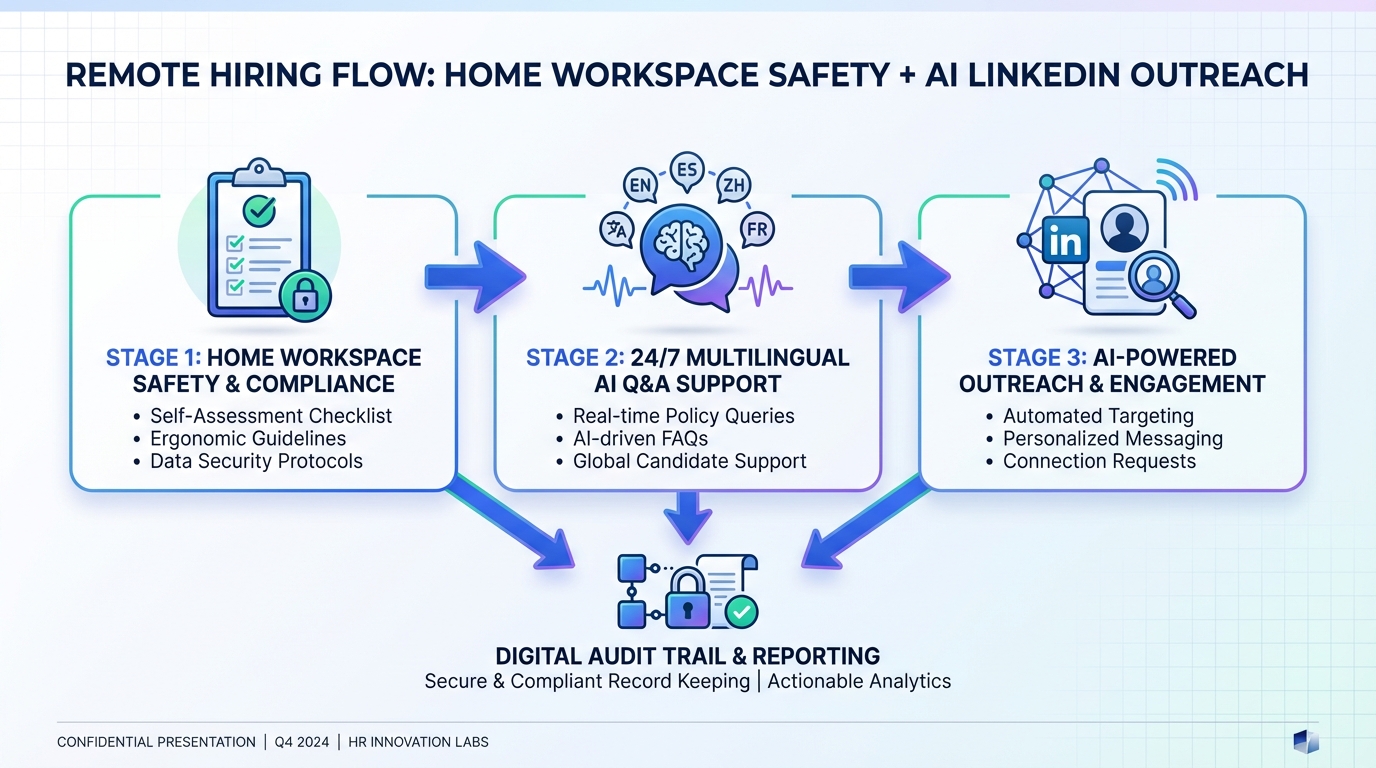
An AI recruiting tool can help you hire for remote roles more safely and consistently by turning work from home health and safety expectations into repeatable messages, checklists, and documented check ins. The practical approach is simple: define what a safe home workspace looks like, define how employees check in when working alone or in isolation, and define how training and injury reporting works. Then use automation to deliver those expectations to candidates early, collect resumes and contact details, and keep a clean audit trail. In this guide, we rebuild a remote safety procedure into a recruiter workflow and show where StrategyBrain AI Recruiter fits naturally for LinkedIn outreach, 24/7 multilingual Q and A, and follow up.
Key Takeaways
- Remote safety is still an employer responsibility: if someone is on the clock at home, hazards and incident reporting still matter.
- Use a monthly home workspace inspection checklist: cover ergonomics, electrical safety, tripping hazards, lighting, and stressors.
- Document check ins for isolated work: track successful and missed check ins at shift start and shift end at minimum.
- Train and document: fire and earthquake procedures, hygiene basics, and role specific hazards should be recorded.
- Automate candidate communication without losing control: StrategyBrain AI Recruiter can handle initial LinkedIn outreach, Q and A, and resume collection while recruiters do final qualification.
- Plan for global hiring: 24/7 multilingual messaging reduces delays and misunderstandings across time zones.
Why remote safety belongs in hiring
When your team works in a stable office, it is easy to assume safety is handled because exits, signage, and layouts rarely change. Remote work flips that assumption. A home office can be safe, but it can also introduce new risks such as poor ergonomics, overloaded power bars, or inadequate lighting. If an employee is working alone or in isolation, many jurisdictions require employers to outline procedures to check in on well being and address hazards.
From a recruiting perspective, this matters because candidates evaluate remote roles based on clarity and support. If you can explain your work from home safety procedure early, you reduce surprises after offer acceptance and you set expectations that protect both the employee and the employer.
Method 1: Home workspace safety checklist
A monthly inspection checklist is the simplest way to make remote safety real. In our own office move into a new LEED certified building, we used the transition to fix chair ergonomics, remove clutter, and tie up loose cables. Remote work removes that shared baseline, so you need a checklist that employees can run at home and that managers can review.
What to include in the checklist
Use a single page checklist that employees can complete in under 10 minutes. The following inspection categories are commonly referenced in government guidance for flexible workplaces and safety inspections.
- Ergonomics: chair, desk height, monitor position, and sustained comfort for sessions longer than 2 hours.
- Electrical safety: power bars, cable condition, and outlet loading.
- Tripping and falling hazards: loose cables, cluttered walkways, and unstable rugs.
- Environmental hazards: adequate lighting and ventilation.
- Potential of violence: role dependent, include guidance for client facing or field work.
- Vehicle safety: only if the employee uses a vehicle for work tasks.
- Biological and chemical hazards: role dependent, include storage and exposure guidance.
- Workplace stressors: workload, isolation, and escalation paths.
Recruiter ready template you can copy
Below is a copyable checklist template you can paste into your HR system or onboarding packet. It is intentionally plain so it can be localized and adapted by jurisdiction.
Monthly Work From Home Safety Inspection Template
- Employee name: ____________________
- Role: ____________________
- Inspection date: ____________________
- Ergonomics: Chair and desk allow neutral posture for 2 hours without pain. Yes or No. Notes: __________
- Electrical safety: No damaged cords. Power bars not overloaded. Yes or No. Notes: __________
- Trip hazards: Walkways clear. Cables secured. Yes or No. Notes: __________
- Lighting: Work area has adequate lighting for screen and paper tasks. Yes or No. Notes: __________
- Emergency readiness: First aid kit accessible. Knows emergency contacts. Yes or No. Notes: __________
- Stressors: Workload manageable. Knows how to request support. Yes or No. Notes: __________
Best For
- Remote first teams that need a consistent baseline across many home setups.
- Roles with extended computer time where ergonomics is a primary risk.
- Organizations that want a documented monthly routine.
Limitations
- A checklist does not replace a jurisdiction specific occupational health and safety program.
- Some hazards are role specific and require a separate addendum.
Method 2: Check in procedure for isolated work
If an employee is working alone or in isolation, a check in procedure is a core control. The operational goal is to confirm well being and to create a record of successful and missed check ins.
Steps
- Define check in times: start of shift and end of shift as the default minimum.
- Pick a channel: email, phone call, or a company messaging tool.
- Document outcomes: record successful check ins and missed check ins.
- Define escalation: specify who calls, when, and what to do if there is no response.
How an AI recruiting tool supports this before day one
This is where an AI recruiting tool becomes more than sourcing. During hiring, you can standardize how you explain check in expectations to candidates. With StrategyBrain AI Recruiter, we have seen that candidates ask practical questions early, such as schedule flexibility and communication norms. Having an automated Q and A flow that can respond 24/7 helps you keep the process moving while ensuring every candidate receives the same policy language.
Best For
- Remote roles with independent work blocks and limited real time supervision.
- Teams hiring across time zones where managers are not always online.
Limitations
- Check ins must be enforced operationally. Automation can remind and record, but managers still own follow through.
Method 3: Training and injury reporting
Remote work changes the setting, not the responsibility. Employees still need to know what to do in emergencies such as a fire or earthquake, and they still need clear guidance on hygiene and safe food preparation. Training may take a few iterations to get right, but the key is to implement it and document it.
Injury reporting is also straightforward but often overlooked. If an employee trips on a power bar and sprains an ankle during their shift, it is a workplace injury. Your procedure should explain how to report, who to notify, and what documentation is required.
Steps
- List required training modules: emergency procedures, hygiene basics, and role specific hazards.
- Assign completion deadlines: for example, within the first 5 business days of employment.
- Document completion: store completion records in your HR system.
- Publish an injury reporting workflow: include response time expectations and escalation contacts.
Best For
- Organizations scaling remote hiring who need consistent onboarding quality.
- Regulated environments where documentation is essential.
Limitations
- Training content must be reviewed for local legal requirements.
Method 4: Using an AI recruiting tool to standardize communication
Many teams buy recruiting tools to find candidates, then discover the real bottleneck is repetitive messaging and follow up. We tested a remote hiring workflow where the recruiter sends the same explanations repeatedly: role basics, compensation range, remote expectations, safety checklist, check in norms, and next steps. The content is important, but the repetition slows response times.
StrategyBrain AI Recruiter is designed to automate the initial LinkedIn recruiting workflow. It can automatically connect with candidates that match your search criteria, introduce the opportunity, answer questions about the role, company, and compensation, confirm interview interest, and collect resumes and contact information from interested candidates. Recruiters then review the collected resumes and proceed with interviews. This division of labor matters because the tool can handle volume while the recruiter keeps final judgment.
How it works in a remote safety aware hiring flow
- Provide role and policy inputs: include job details, compensation, benefits, candidate criteria, and your work from home safety expectations.
- Automate outreach and Q and A: candidates receive consistent answers, including check in expectations and onboarding steps.
- Collect resumes and contact details: interested candidates share a resume and contact info, which is captured for recruiter review.
- Recruiter completes qualification: the tool identifies willingness to communicate or interview, but it does not decide if the resume matches requirements.
Features that matter for global remote hiring
- 24/7 multilingual communication: the system can communicate in the candidate native language, reducing misunderstandings and time zone delays.
- Scalable account management: supports managing more than 100 LinkedIn accounts for teams that need high volume outreach.
- Privacy and security posture: customer provided data is not used to train AI models, and credentials are encrypted and stored per user with explicit authorization.
Pain points we encountered and how we handled them
- Policy ambiguity creates long message threads: we tightened the safety checklist language to yes or no items and reduced back and forth.
- Candidate questions vary by country: multilingual responses helped, but we still added a recruiter escalation rule for complex legal questions.
- Automation can over promise if inputs are incomplete: we only included compensation and benefits details that we were ready to honor.
Best For
- Corporate recruiters who want to reduce manual LinkedIn outreach and follow up.
- Headhunters and agencies that need to scale conversations without adding staff.
- HR leaders building an AI powered recruiting team across multiple LinkedIn accounts.
Limitations
- It does not replace recruiter judgment on resume fit and final qualification.
- It does not replace legal review of safety policies and employment requirements.
Quick Comparison
| Method | Primary outcome | Speed to implement | Best for |
|---|---|---|---|
| Home workspace safety checklist | Documented monthly hazard review | 1 business day | Ergonomics, electrical safety, trip hazards |
| Check in procedure | Well being confirmation and audit trail | 1 business day | Isolated work and remote shifts |
| Training and injury reporting | Consistent onboarding and incident response | 3 to 10 business days | Regulated or higher risk roles |
| AI recruiting tool workflow with StrategyBrain AI Recruiter | Standardized outreach, Q and A, resume collection | Depends on role inputs and LinkedIn setup | Teams that need scalable candidate communication |
FAQ
What is an AI recruiting tool in practical terms?
An AI recruiting tool is software that automates parts of recruiting such as sourcing, outreach, messaging, and screening workflows. In this guide, we focus on automation that standardizes candidate communication and follow up while keeping recruiters responsible for final hiring decisions.
Do employers still have health and safety responsibilities when employees work from home?
Yes. If an employee is working while on the clock, employers generally still need procedures to address hazards and respond to incidents. Requirements vary by jurisdiction, so you should align your process with local occupational health and safety rules.
What should a work from home safety checklist include?
A solid checklist covers ergonomics, electrical safety, tripping and falling hazards, environmental hazards such as lighting, and workplace stressors. Add role specific items such as vehicle safety or chemical hazards only when relevant.
How often should remote employees complete safety inspections?
A monthly cadence is a common operational choice because it is frequent enough to catch changes in home setups. If risk is higher, you can increase frequency and add manager review.
What is a check in procedure for isolated work?
It is a documented process where employees confirm they are safe at defined times, typically at the start and end of a shift. The employer records successful and missed check ins and defines escalation steps for no response.
How does StrategyBrain AI Recruiter help with LinkedIn recruiting?
StrategyBrain AI Recruiter automates initial LinkedIn outreach by connecting with candidates that match your criteria, introducing the role, answering questions, confirming interview interest, and collecting resumes and contact details. Recruiters then review resumes and complete final qualification.
Can StrategyBrain AI Recruiter communicate with candidates in different languages?
Yes. It supports multilingual communication and can respond around the clock, which helps when you are hiring across countries and time zones.
Does the tool decide whether a candidate is qualified?
No. It can identify willingness to communicate or interview, but it does not determine whether a resume fully matches job requirements. Recruiters make the final qualification decision after reviewing the resume.
How should we handle legal questions candidates ask about safety compliance?
Use standardized policy language for what you can confidently state, and route complex jurisdiction specific questions to a human recruiter or HR leader. This keeps communication accurate and reduces risk from over generalized answers.
Conclusion
Remote work safety is not a side topic. It is part of responsible hiring and onboarding. If you implement a monthly home workspace checklist, a documented check in procedure, and clear training and injury reporting, you create a safer baseline for remote employees. Then, by using an AI recruiting tool to standardize outreach and follow up, you reduce repetitive work and improve candidate experience.
Next steps: copy the checklist template above into your onboarding flow, define your check in escalation rule, and if LinkedIn outreach is your bottleneck, pilot StrategyBrain AI Recruiter for automated candidate engagement and resume collection while keeping recruiter led final qualification.















