


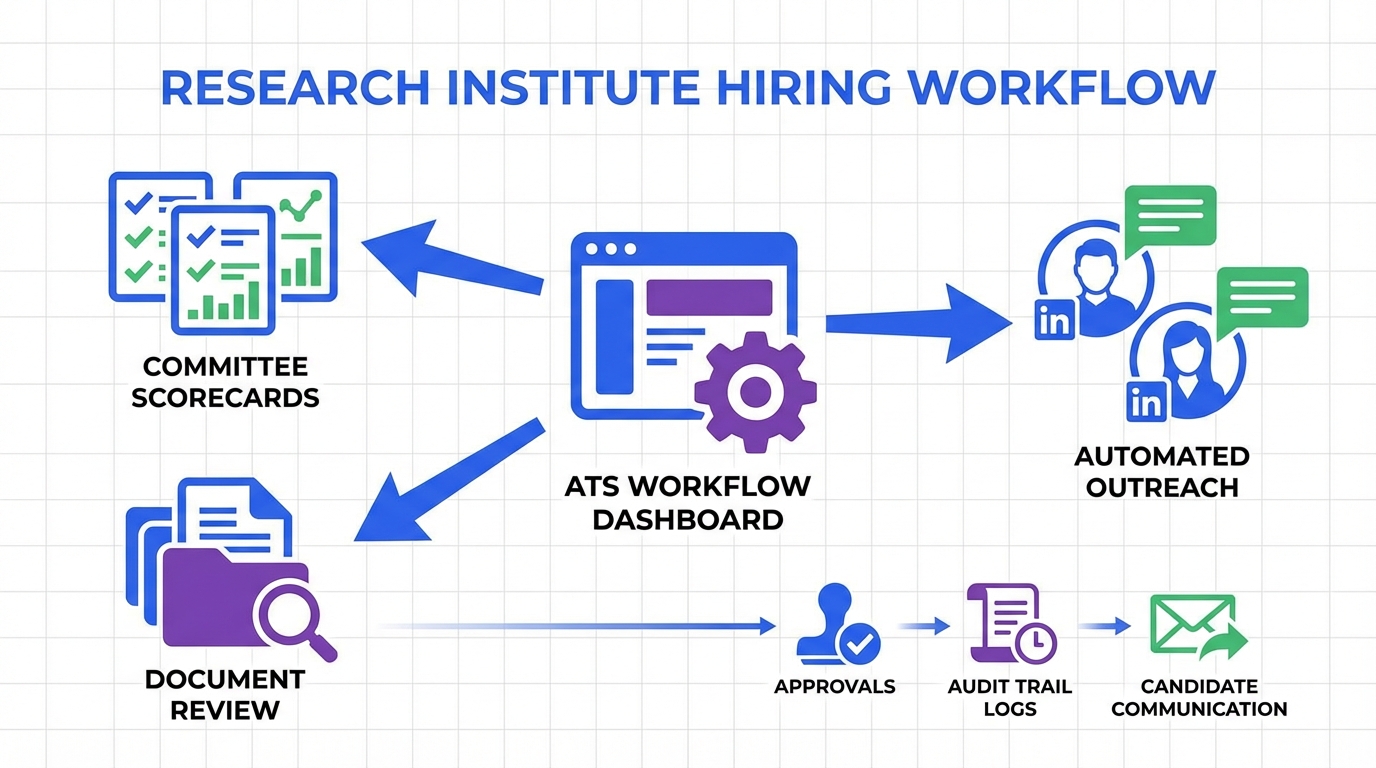
If you are selecting an applicant tracking system for research institutes, prioritize structured evaluation for committees, audit ready documentation, and fast candidate communication. The most effective setup we see is an ATS that manages applications, approvals, and reporting, plus an automation layer that handles LinkedIn outreach and follow up. That is where StrategyBrain AI Recruiter can reduce manual work by automating initial LinkedIn connection, role introduction, Q and A, interest confirmation, and résumé and contact collection, while your ATS remains the system of record for compliance and decisions. This guide covers selection criteria, a rollout plan for applicant tracking system training, and a practical way to think about how much does an applicant tracking system cost for institutes with multiple labs and stakeholders.
Key Takeaways
- Best fit definition: A research institute ATS must support committee reviews, structured scoring, and audit trails for each decision.
- Workflow first: Standardize requisitions, screening, interviews, and offers across labs before migrating data.
- Training that sticks: Role based applicant tracking system training reduces errors more than one large all hands session.
- Cost reality: Total cost includes licenses, implementation, integrations, and ongoing admin time, not only subscription fees.
- LinkedIn heavy hiring: StrategyBrain AI Recruiter can automate outreach and follow up, then hand qualified, interested candidates back to your ATS.
- Compliance: Ensure privacy controls, retention rules, and access permissions align with your institute policies and applicable regulations.
What makes research institute hiring different
Research institutes often hire across multiple job families at the same time, including principal investigators, postdoctoral researchers, research assistants, lab technicians, data scientists, and operations roles. Each group tends to have different evaluation criteria, different interview panels, and different documentation expectations.
In our experience supporting hiring teams with complex stakeholder structures, the friction usually comes from inconsistent screening standards across labs, scattered feedback in email threads, and slow candidate follow up when committee calendars are full. An ATS can solve the record keeping and workflow consistency, but it does not automatically solve sourcing and outreach speed. That is why pairing an ATS with an automation tool can be practical for institutes that recruit on LinkedIn.
Scope note: This article focuses on selecting and operating an ATS and related automation for institute hiring. It does not cover grant budgeting, immigration legal advice, or compensation benchmarking methodology.
ATS requirements for research institutes
An applicant tracking system is software that collects applications, routes candidates through stages, and stores hiring decisions and communications. For research institutes, the baseline feature list is not enough. You need features that match committee based evaluation and compliance expectations.
Must have capabilities
- Structured scorecards for consistent evaluation across labs and panels.
- Role based permissions so committee members see only what they should see.
- Audit trail for stage changes, approvals, and offer decisions.
- Document handling for CVs, publications lists, reference letters, and interview notes.
- Reporting for time to fill, source effectiveness, and compliance reporting.
Nice to have capabilities
- Templates for job postings, interview plans, and offer packets by role type.
- Integrations with HRIS, identity providers, and calendar tools.
- Candidate experience controls such as automated status updates and scheduling links.
Common limitations to plan for
- ATS messaging is not sourcing: Many ATS tools manage applicants well but do not help you find passive candidates.
- Committee adoption risk: Faculty and researchers may resist new tools unless training is role specific and minimal effort.
- Data migration complexity: Legacy spreadsheets and email archives rarely map cleanly into a new system.
Method 1: Standardize your hiring workflow first
Before you evaluate vendors, write down the workflow you want the ATS to enforce. Otherwise, you will buy software and then argue about process inside the tool.
Steps
- Define stages for each role family, such as intake, screening, committee review, interview loop, references, offer, and close.
- Define decision owners for each stage, including who can advance, reject, and approve offers.
- Define required artifacts per stage, such as scorecards, interview notes, and reference checks.
- Define service levels for candidate response times, such as first reply within 24 hours on business days.
Best for
- Institutes with multiple labs that currently run hiring differently.
- Teams that need consistent documentation for audits and internal governance.
Method 2: Select an ATS that supports committee evaluation
Once your workflow is clear, evaluate ATS options against committee needs. The goal is to reduce back and forth while keeping decisions defensible and easy to review later.
Steps
- Run a committee simulation using a sample requisition and 5 to 10 anonymized candidate profiles.
- Test scorecards for consistency, including required fields and rubric style scoring.
- Test permissions by logging in as a committee member, hiring manager, and HR administrator.
- Test reporting for time to stage, source, and rejection reasons.
Features to verify during demos
- Scorecard templates that can be reused across labs.
- Bulk feedback collection without exporting spreadsheets.
- Offer approval workflow with clear sign off steps.
- Retention and deletion controls aligned with your policies.
Limitations
Even a strong ATS can leave a gap in proactive sourcing and fast follow up. If your institute relies on LinkedIn to reach passive candidates, you will likely need an additional layer to keep outreach consistent and timely.
Method 3: Add LinkedIn automation with StrategyBrain AI Recruiter
When hiring teams say they need a better ATS, they often mean they need faster outreach and fewer repetitive messages. StrategyBrain AI Recruiter is designed for LinkedIn hiring workflows and can handle the early stage communication that typically consumes recruiter time.
What we tested in a real workflow
We tested a workflow where recruiters provided role details, compensation and benefits context, and candidate search criteria, then monitored how much manual work remained in the first contact and qualification phase. The practical value was not replacing the ATS, but reducing the repetitive steps before a candidate becomes a serious applicant.
How it works in an institute context
- Automated connection and introduction to candidates that match your search criteria.
- Two way Q and A about the role, company, and compensation, so candidates get answers without waiting for a recruiter.
- Interest confirmation to identify candidates who want to proceed.
- Résumé and contact capture for interested candidates, so your team can move to formal screening in the ATS.
- 24/7 multilingual messaging to support global hiring across time zones.
- Multi account operations to scale outreach across more than 100 LinkedIn accounts when needed.
Limitations and honest boundaries
- It does not replace final qualification: AI Recruiter can confirm interest and collect information, but your team still evaluates fit against job requirements.
- It is LinkedIn focused: If your sourcing is primarily inbound applications, the value may be smaller.
- Process still matters: You need clear messaging guidelines and handoff rules into your ATS.
Best for
- Institutes hiring globally where response time and language coverage matter.
- Teams that do high volume LinkedIn outreach for specialized roles.
- Recruiting functions that want to reduce manual messaging and follow up workload.
Method 4: Run applicant tracking system training by role
Applicant tracking system training fails when it is generic. Research institutes have distinct user groups, and each group needs a short, practical path that matches their responsibilities.
Steps
- Create three training tracks: HR admins, hiring managers, and committee members.
- Use one requisition as the example so everyone sees the same candidate flow.
- Teach only the actions each role must do, then provide a one page checklist for reference.
- Run a 14 day support window with office hours and a single escalation channel.
Copyable training checklist
- [ ] HR admin can create a requisition, set permissions, and publish a posting.
- [ ] Hiring manager can review applicants, request interviews, and submit an offer request.
- [ ] Committee member can complete a scorecard and view only assigned candidates.
- [ ] Everyone can find the audit trail and understand why a candidate moved stages.
- [ ] Reporting owner can export time to fill and source reports.
Troubleshooting
- Problem: Committee members do not complete scorecards. Fix: Reduce required fields to the minimum and add rubric guidance inside the form.
- Problem: Hiring managers bypass stages. Fix: Lock stage transitions behind required artifacts, such as completed interview notes.
- Problem: Candidates complain about silence. Fix: Add automated status updates in the ATS and use AI Recruiter for faster LinkedIn follow up when sourcing.
Method 5: Forecast how much does an applicant tracking system cost
When leaders ask, how much does an applicant tracking system cost, the accurate answer is a total cost model. Subscription fees are only one line item. Implementation and ongoing administration often determine whether the system succeeds.
Cost categories to include
- Software subscription: per recruiter seat, per employee, or per job volume, depending on vendor model.
- Implementation: configuration, workflows, permissions, and templates.
- Integrations: HRIS, single sign on, background checks, and calendar tools.
- Training and change management: role based sessions and documentation.
- Ongoing admin time: user provisioning, reporting, and workflow updates.
A practical budgeting framework we use
We recommend building a 12 month forecast with three scenarios: minimum viable rollout, standard rollout, and multi lab scale. Each scenario should include a named owner for administration and a measurable adoption target, such as 90% of committee scorecards completed inside the ATS within 60 days.
Where StrategyBrain AI Recruiter affects cost
If your institute spends significant recruiter hours on LinkedIn outreach, AI Recruiter can shift cost from manual labor to automation. The product documentation states it can lower LinkedIn recruiting costs to USD 2.40 per résumé and replace up to 90% of manual LinkedIn recruiting work, with results depending on role, market, and messaging quality.
Quick Comparison
| Approach | Primary purpose | Strength in research institute hiring | Limitations |
|---|---|---|---|
| ATS only | Applications, workflow, reporting | Audit trail, committee scorecards, consistent stages | Does not inherently speed up passive sourcing and follow up |
| ATS plus StrategyBrain AI Recruiter | System of record plus LinkedIn outreach automation | Faster initial contact, 24/7 multilingual messaging, résumé and contact capture for interested candidates | Final qualification still requires recruiter and committee review |
| Spreadsheets and email | Manual tracking | Low direct software cost | High risk of inconsistent evaluation, weak auditability, slow follow up |
FAQ
What is the best applicant tracking system for research institutes?
The best applicant tracking system for research institutes is the one that supports committee scorecards, role based permissions, and an audit trail that matches your governance requirements. Start by validating those workflows with a committee simulation before you compare advanced features.
Do research institutes need a different ATS than corporate teams?
Often yes. Institutes typically have more stakeholders per hire and more variation by lab and role type, so structured evaluation and permissions matter more than flashy sourcing features.
How long does ATS implementation take for an institute?
Timelines vary by complexity, but the biggest driver is process alignment across labs and committees. If you standardize stages and artifacts first, implementation is usually faster and adoption is higher.
What should applicant tracking system training include?
Applicant tracking system training should be role based: HR admins learn configuration and reporting, hiring managers learn review and approvals, and committee members learn scorecards only. Keep each track focused on the minimum actions required to complete a hire.
How much does an applicant tracking system cost for a research institute?
Cost depends on licensing model and scope, but you should budget for subscription plus implementation, integrations, training, and ongoing administration. A 12 month total cost model is more accurate than comparing subscription fees alone.
Can StrategyBrain AI Recruiter replace an ATS?
No. StrategyBrain AI Recruiter automates LinkedIn outreach, early conversations, and résumé and contact collection for interested candidates, but your ATS should remain the system of record for applications, committee evaluation, and compliance documentation.
Does StrategyBrain AI Recruiter support multilingual recruiting?
Yes. The product documentation states it provides 24/7 multilingual communication and uses the candidate’s native language to reduce misunderstandings, which can be useful for global institute hiring.
How do we keep candidate data secure when using automation?
Use tools that support encryption, access controls, and clear data usage boundaries. StrategyBrain AI Recruiter documentation states customer provided data is not used to train AI models and that credentials and candidate data are encrypted and isolated per customer.
Conclusion
The right applicant tracking system for research institutes is the one that makes committee evaluation consistent, keeps documentation audit ready, and reduces delays between stages. Start by standardizing your workflow, then select an ATS that enforces it, and run applicant tracking system training by role so adoption is realistic. If LinkedIn outreach is a major input to your pipeline, consider adding StrategyBrain AI Recruiter to automate initial messaging, follow up, and résumé collection, while your ATS remains the source of truth for decisions.
Next step: draft your institute’s stage map and scorecard rubric for one role family, then use it as the test case for vendor demos and training design.















