


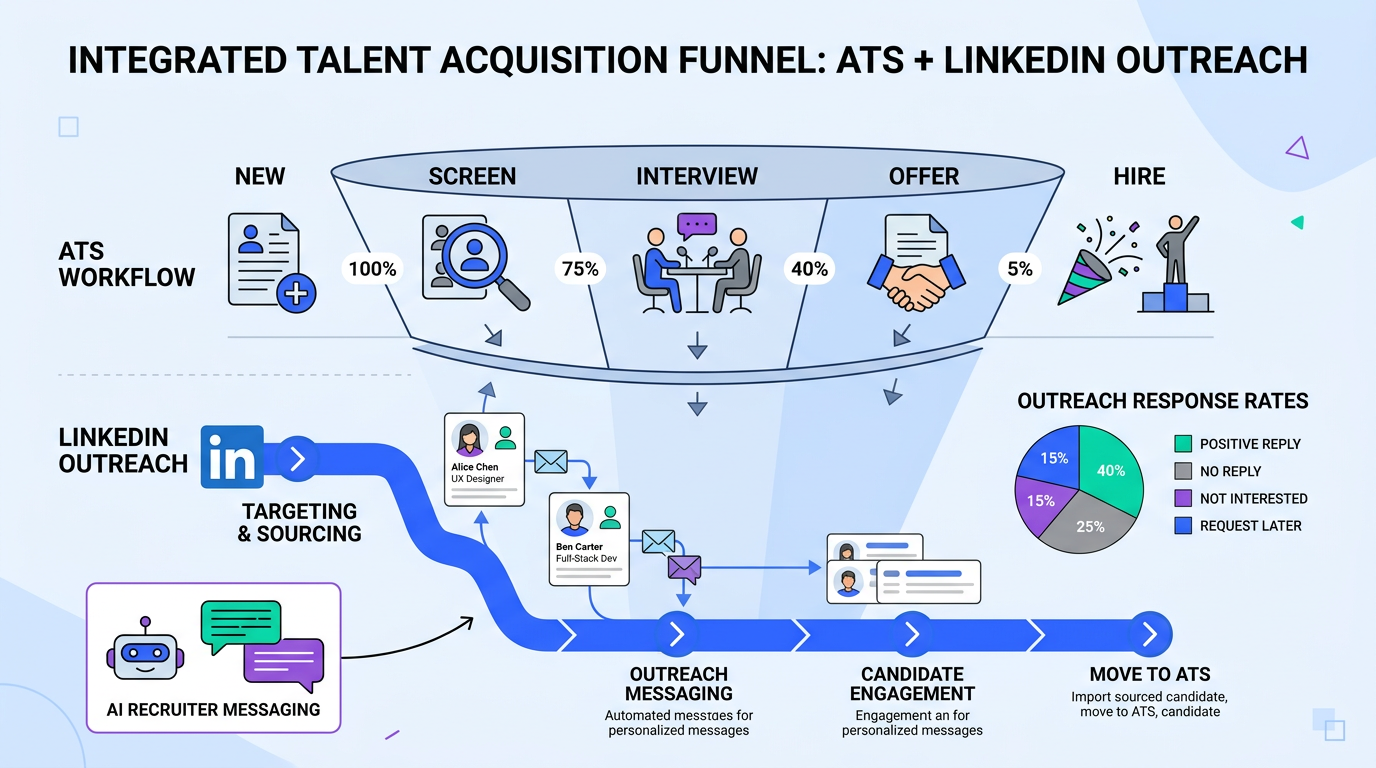
ATS for recruiters are applicant tracking systems that centralize applications, convert resumes into searchable fields, and route candidates through an ATS hiring workflow such as applied, screened, interviewed, and offered. If you want better results quickly, start by defining what “success” looks like for the role, then align your ATS stages, knockout questions, and evaluation criteria to that definition. In our day to day recruiting operations, we see the biggest gains when teams combine a clean ATS process with fast outbound outreach. That is where StrategyBrain AI Recruiter fits naturally, because it automates LinkedIn connecting, role introduction, Q and A, follow up, and resume plus contact capture so recruiters can spend time on final qualification and interviews.
What an ATS is and what it is not
An ATS (applicant tracking system) is software that stores candidate records, tracks status changes, and supports collaboration across recruiters and hiring managers. Most ATS platforms also include resume parsing, which means extracting text from a resume and mapping it into fields like job titles, skills, employers, and dates.
What an ATS is not is a full replacement for recruiting judgment. An ATS can help you organize and filter, but it cannot reliably determine role fit on its own. In our experience, the best teams treat the ATS as the system of record and pair it with structured evaluation and fast candidate communication.
Scope boundaries for this guide
- This guide focuses on ATS for recruiters and practical workflow design.
- It does not cover vendor specific configuration screens for any single ATS.
- It includes a practical way to combine ATS hiring with LinkedIn outreach using StrategyBrain AI Recruiter.
How do ATS systems work in real recruiting workflows
When people ask how do ATS systems work, they usually mean “what happens to an application after someone clicks apply.” In a typical ATS hiring flow, the system does five jobs in sequence.
1) Intake and record creation
The ATS creates a candidate profile from an application form, email import, referral submission, or job board feed. The profile becomes the single record recruiters use for notes, stage changes, and reporting.
2) Resume parsing and normalization
The ATS parses the resume and tries to normalize data into consistent fields. This is why formatting matters. A resume that is visually beautiful can still parse poorly if it relies on tables, columns, or images.
3) Screening signals and filters
Most systems support screening questions, tags, and filters. Some also support scoring rules. Recruiters should treat these as triage tools, not final decisions, because false negatives can happen when parsing is imperfect.
4) Workflow stages and collaboration
Candidates move through stages such as new, phone screen, interview, offer, and hired. The ATS logs who moved the candidate, when it happened, and what feedback was recorded.
5) Compliance and reporting
ATS platforms often store consent, track disposition reasons, and produce reports like time to fill and source of hire. For regulated environments, this record keeping is a core reason ATS adoption is so common.
Define hiring success before you touch the ATS
The most common ATS failure we see is not technical. It is strategic. Teams configure stages and filters before they agree on what “good” looks like. The result is a workflow that looks organized but does not produce consistent decisions.
A simple definition framework we use
Before opening your ATS settings, write a one page role success definition with four parts.
- Business outcome: What must this hire accomplish in the first 180 days.
- Must have capabilities: 3 to 5 capabilities that are non negotiable.
- Nice to have signals: 3 to 5 signals that improve odds but are not required.
- Deal breakers: 2 to 4 disqualifiers you can screen early.
This framework mirrors the idea from the source material that hiring should start with understanding the challenge and aligning evaluation to company goals, rather than starting with generic checklists.
Configure an ATS hiring workflow that recruiters actually use
Once success is defined, your ATS workflow should make the next action obvious. If recruiters need to invent a process on every requisition, the ATS becomes a database instead of a workflow engine.
Recommended baseline stages
- New: Application received or profile created.
- Recruiter screen: Quick qualification for deal breakers and must haves.
- Hiring manager review: Structured review against must have capabilities.
- Interview: Interview plan and scorecards attached to the record.
- Offer: Offer details and approvals tracked.
- Hired: Final disposition and handoff to onboarding.
- Rejected: Disposition reason recorded for reporting and compliance.
Practical configuration checklist
- Use the same stage names across roles so reporting is consistent.
- Require a disposition reason at rejection to avoid “silent” pipeline loss.
- Attach a scorecard template to the interview stage so feedback is comparable.
- Limit custom tags to a controlled list so filters remain reliable.
Screening and evaluation: turning resumes into decisions
ATS hiring improves when screening is treated as a decision system, not a resume reading marathon. We recommend separating screening into two passes so recruiters stay consistent.
Pass 1: eligibility and deal breakers
This pass should take less than 90 seconds per profile for most roles. You are checking only what you defined as disqualifying. If the ATS supports knockout questions, use them, but keep the list short so you do not reduce applicant completion rates.
Pass 2: evidence for must have capabilities
This pass is where recruiters look for evidence, not keywords. Keywords can be a starting point, but evidence is what you can defend in a debrief. For example, “scaled paid acquisition from X to Y” is evidence. “Growth mindset” is not evidence unless it is tied to a concrete example.
Limitations we see in real ATS screening
- Parsing errors: Titles and dates can be misread, especially with complex formatting.
- Over filtering: Strict keyword filters can remove qualified candidates who use different terminology.
- Inconsistent feedback: Without scorecards, interview notes become hard to compare.
Adding a LinkedIn outreach layer with StrategyBrain AI Recruiter
An ATS is strongest for inbound applications and process control. LinkedIn is strongest for outbound sourcing and fast conversations. The operational gap is that recruiters often do not have enough hours to connect, introduce the role, answer questions, follow up, and collect resumes at scale.
StrategyBrain AI Recruiter is designed specifically for LinkedIn recruiting automation. It can automatically connect with candidates that match your search criteria, introduce the opportunity, learn the candidate’s situation, answer questions about the role, company, compensation, and benefits, confirm interview interest, and collect resumes and contact information from interested candidates. It also supports 24/7 multilingual communication and can manage more than 100 LinkedIn accounts for teams that need scale.
How we recommend using AI Recruiter alongside ATS for recruiters
- Define the outreach target: Use the same must have capabilities you defined for ATS hiring to build your LinkedIn search criteria.
- Standardize the role brief: Provide AI Recruiter with the job opening details, including company context, compensation, benefits, and screening questions you want asked early.
- Automate first contact and follow up: Let AI Recruiter handle connecting, initial messaging, Q and A, and follow ups so candidates do not go cold overnight or across time zones.
- Capture resumes and contacts: When candidates are interested, AI Recruiter requests resumes and captures contact details. Recruiters then review the resume for final qualification.
- Sync back to your ATS: Create or update the candidate record in your ATS as soon as resume and contact details are captured, so the ATS remains the system of record.
What AI Recruiter does not do
AI Recruiter can identify willingness to proceed and collect materials, but it does not decide whether the resume fully matches job requirements. That final qualification remains a recruiter decision, which is the right boundary for quality control.
Common ATS mistakes and how to fix them
Mistake 1: treating the ATS like a filing cabinet
If your ATS is only used to store resumes, you lose the benefit of consistent stages and reporting. Fix this by making stage movement part of the daily routine and by keeping stages simple.
Mistake 2: building workflows that do not match the role
A startup hiring a first marketing leader and an enterprise hiring a campaign optimizer should not use identical evaluation signals. Fix this by starting with the role success definition and then mapping stages and scorecards to it.
Mistake 3: slow candidate communication
Even a perfect ATS workflow fails if candidates wait days for a reply. Fix this by setting response time expectations and using automation where it is appropriate. For LinkedIn sourcing, StrategyBrain AI Recruiter can keep conversations moving 24/7 and in the candidate’s native language.
Mistake 4: over relying on keyword filters
Keyword filters can be useful, but they should not be the only gate. Fix this by using deal breakers for pass 1 and evidence based evaluation for pass 2.
Quick comparison: ATS vs LinkedIn automation vs combined workflow
| Approach | Primary strength | Primary limitation | Best for |
|---|---|---|---|
| ATS only | Central record, stages, compliance, reporting | Outbound sourcing and follow up are still manual | High inbound roles and structured hiring teams |
| LinkedIn manual outreach only | Direct access to passive candidates | Time intensive messaging and inconsistent follow up | Specialized roles with low inbound volume |
| ATS plus StrategyBrain AI Recruiter | Process control plus automated connecting, Q and A, follow up, resume capture | Requires clear role brief and recruiter review for final qualification | Teams that need speed, scale, and global candidate communication |
FAQ
What does ATS stand for in recruiting?
ATS stands for applicant tracking system. It is software used by recruiters to store candidate records, track hiring stages, and manage screening and interview workflows.
How do ATS systems work from application to interview?
Most ATS platforms create a candidate record, parse the resume into fields, apply screening questions or filters, and then route the candidate through stages such as recruiter screen, hiring manager review, and interview. The system logs decisions and feedback for reporting and compliance.
Do ATS systems automatically reject candidates?
Some ATS setups can auto reject based on knockout questions or rules, but many rejections are still manual. Because parsing and keyword matching can be imperfect, we recommend using automation for clear deal breakers only.
Is an ATS enough for sourcing candidates?
An ATS is excellent for managing inbound applicants, but it is not a complete sourcing solution. For outbound sourcing, recruiters often rely on LinkedIn, and tools like StrategyBrain AI Recruiter can automate connecting, messaging, follow up, and resume capture.
How does StrategyBrain AI Recruiter fit into ATS hiring?
StrategyBrain AI Recruiter handles the top of funnel LinkedIn workflow by connecting with candidates, introducing the role, answering questions, following up, and collecting resumes and contact details. Recruiters then create or update the candidate record in the ATS and complete final qualification and interviews.
Can AI Recruiter qualify candidates for job fit?
AI Recruiter can confirm interest and collect information, but it does not decide whether a resume fully matches job requirements. Recruiters should review resumes and apply structured scorecards for final fit decisions.
Does AI Recruiter support multilingual recruiting?
Yes. AI Recruiter supports 24/7 multilingual communication so candidates can interact in their native language, which helps reduce misunderstandings and keeps conversations moving across time zones.
What is the biggest improvement recruiters can make inside an ATS?
Define role success and align stages, screening, and scorecards to that definition. When teams do this, ATS data becomes consistent and decisions become easier to defend in debriefs.
Conclusion and next steps
ATS for recruiters work best when they reflect a clear definition of role success, a simple stage model, and evidence based screening. If you also need faster outbound sourcing and candidate communication, add a LinkedIn automation layer that does not compromise recruiter judgment. StrategyBrain AI Recruiter is built for that gap by automating connecting, role introduction, Q and A, follow up, and resume plus contact capture, while leaving final qualification to recruiters.
Next steps
- Write a one page role success definition for your next requisition.
- Audit your ATS stages and remove any stage that does not change a decision.
- Standardize a scorecard for the interview stage.
- For LinkedIn sourcing heavy roles, pilot StrategyBrain AI Recruiter with one role and measure response speed, resume capture volume, and recruiter time saved.















