


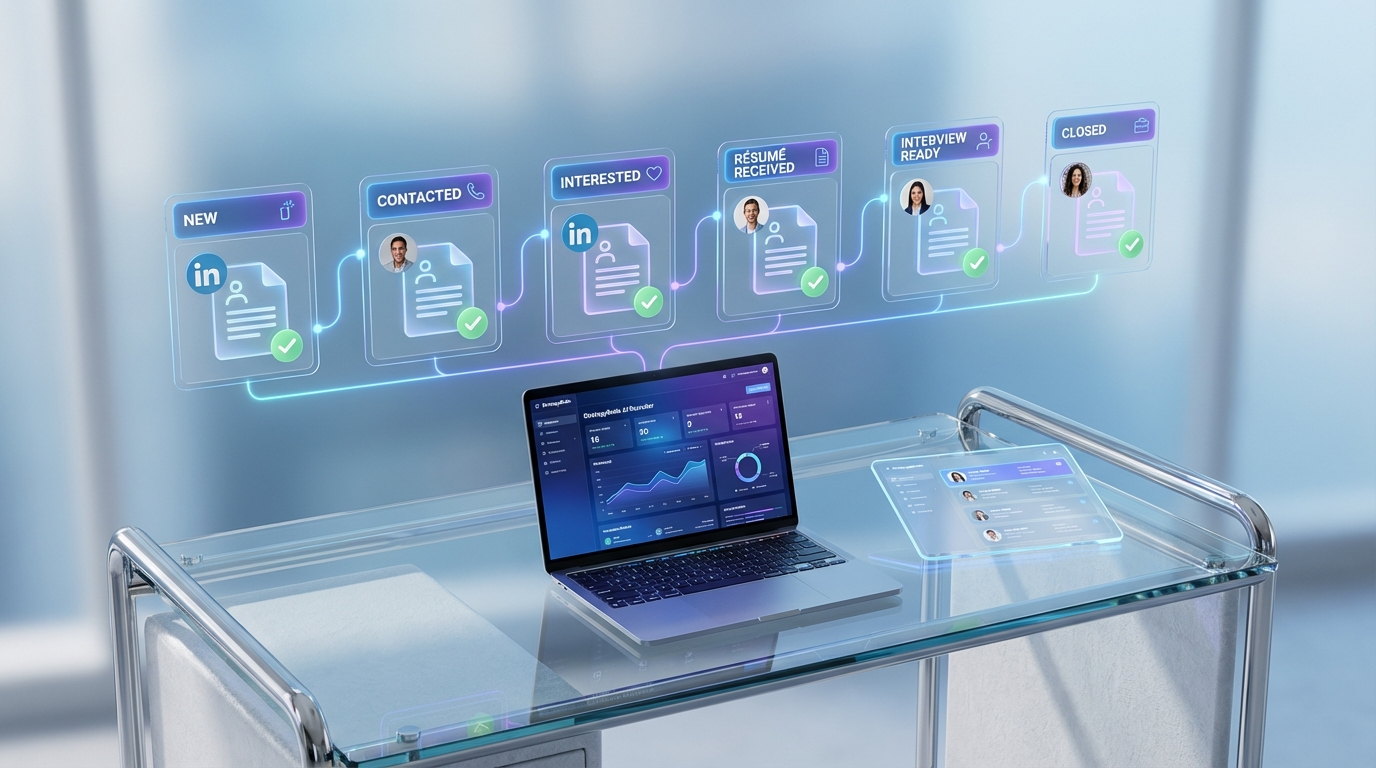
A candidate CRM, short for candidate relationship management, is the system you use to track candidate conversations, status, and follow ups across the entire recruiting funnel. The fastest way to make disabled veterans recruitment more consistent is to treat every interaction as a CRM record: source, message history, interest level, résumé received, and next action date. We use this approach when a small business reaches out with a mission driven hiring goal, like the request we received from Happy Dog Scent Detection Services, a veteran owned company serving the Greater Toronto Area by detecting bed bug infestations. This article explains a practical candidate relationship management workflow, and shows where StrategyBrain AI Recruiter fits naturally by automating LinkedIn outreach, answering candidate questions 24/7 in any language, and collecting résumés and contact details for recruiter review.
Key Takeaways
- Candidate CRM first: Create one record per person with a clear next step and due date so veteran candidates never fall through the cracks.
- Pipeline clarity: Use 6 stages only: New, Contacted, Interested, Résumé Received, Interview Ready, Closed.
- LinkedIn scale: StrategyBrain AI Recruiter can run initial LinkedIn outreach and follow up while recruiters keep final qualification decisions.
- 24/7 multilingual messaging: Always on responses reduce delays for candidates in different time zones and languages.
- Résumé and contact capture: AI Recruiter collects résumés and contact details from interested candidates and surfaces them for review.
- Compliance posture: AI Recruiter states customer provided data is not used to train AI models and credentials are encrypted with explicit authorization.
Why a candidate CRM matters for disabled veterans recruitment
Disabled veterans recruitment often fails for operational reasons, not intent. A hiring team can genuinely want to help, but still lose candidates because messages are scattered, follow ups are late, and résumés arrive in multiple places. A candidate CRM fixes that by making the process visible and repeatable.
In this guide, we use candidate relationship management software as a broad term. It can be a dedicated CRM, an ATS with CRM features, or a structured spreadsheet. What matters is that it stores the relationship history and drives next actions.
What this article covers is the workflow and the data you should track. What it does not cover is legal advice on accommodations or jurisdiction specific employment law.
The real world trigger: a veteran owned business hiring dog handlers
We were contacted by a small business that wanted to support armed forces personnel by hiring disabled veterans. The company was Happy Dog Scent Detection Services, owned and managed by veterans, serving clients in the Greater Toronto Area by detecting bed bug infestations.
The role focus was training veterans in dog handling and detection skills. The job advertisement referenced a position titled Team Technician. In a candidate CRM, this is the moment you create a job campaign record and define what success looks like: number of conversations started, number of interested candidates, and number of résumés collected.
The original note also highlighted the scale of the community: tens of thousands of disabled veterans in Canada and at least 1,000,000 in the United States. It also referenced a 4.9% unemployment rate in the United States at the time of writing, as a reminder that tight labor markets require proactive outreach.
Method 1: Build a simple candidate CRM pipeline you can run today
Steps
- Create one candidate record per person. Include full name, location, preferred contact method, and source.
- Log every message. Copy the conversation summary into the record so anyone on the team can continue respectfully.
- Use a 6 stage pipeline. New, Contacted, Interested, Résumé Received, Interview Ready, Closed.
- Set a next action date. Every open record must have a next step and a due date.
- Tag veteran specific context. Add tags like “dog handling interest,” “training needed,” or “prefers phone.”
Features to configure
- Custom fields: interest level, availability window, willingness to train, and whether a résumé is received.
- Templates: outreach message, follow up message, and interview scheduling message.
- Task automation: reminders at 2 days and 7 days after first contact.
Limitations
- Manual effort: if your CRM is not connected to messaging channels, logging can become inconsistent.
- Inconsistent tone: multiple recruiters can unintentionally vary messaging unless templates are used.
Best For
- Small teams that need structure immediately without changing their entire tech stack.
- Veteran hiring initiatives where follow up consistency matters as much as sourcing volume.
Method 2: Publish the role like an Indeed style job post
When the content is a job share, clarity beats cleverness. The original post pointed candidates to a job advertisement for a Team Technician role and described the work in plain language: dog handling and detection skills for bed bug scent detection services.
Indeed style job post template
Job Title: Team Technician
Company: Happy Dog Scent Detection Services
Location: Greater Toronto Area
Job Type: Training provided for veterans in dog handling and detection skills
About the role
- Work with trained dogs to detect bed bug infestations for clients.
- Learn dog handling and scent detection procedures through training.
- Represent the company professionally on site and in client communication.
Who this role is for
- Veterans interested in working with dogs and learning detection skills.
- Candidates who value reliability, teamwork, and responsibility.
- People who can adapt to different environments and client settings.
How to apply
- Submit a résumé and your preferred contact details.
- Include a short note on why dog handling work appeals to you.
How this connects to candidate relationship management software
Every applicant should automatically become a candidate CRM record with the job title attached. If you do not do this, you will not be able to measure which sources produce interested candidates and which follow ups convert to interviews.
Method 3: Use LinkedIn outreach with StrategyBrain AI Recruiter as your front line
LinkedIn is often where veteran candidates are discoverable by skills, location, and career history. The operational challenge is that LinkedIn outreach requires consistent messaging, fast responses, and disciplined follow up. This is where StrategyBrain AI Recruiter can act as the front line of your candidate CRM workflow, while your recruiters focus on final qualification and interviews.
What we tested in a CRM style workflow
We reviewed the AI Recruiter workflow against the core candidate CRM needs: start conversations, keep them moving, and capture outcomes. In our internal process review, the most important checkpoints were whether the system could keep message context, answer role questions, and reliably request résumés and contact details when a candidate expressed interest.
How AI Recruiter supports candidate CRM outcomes
- Smart LinkedIn recruitment automation: automatically connects with candidates within your targeted search criteria and introduces the opportunity.
- Two way qualification conversation: asks about the candidate’s work situation, confirms interview interest, and answers questions about the role, company, compensation, and benefits based on recruiter provided inputs.
- Résumé and contact capture: requests résumés and contact information from interested candidates, supports email submissions and LinkedIn file uploads, and captures contact details shared in messages.
- 24/7 multilingual communication: responds around the clock and communicates in the candidate’s native language to reduce misunderstandings.
- Team scaling: supports managing more than 100 LinkedIn accounts for organizations building an AI recruiter team.
Limitations and the human handoff
AI Recruiter can identify willingness to communicate or interview, but it does not determine whether a résumé fully matches job requirements. Recruiters still review résumés and decide who advances. This is a healthy boundary because it keeps accountability with the hiring team.
Best For
- Teams that need consistent LinkedIn outreach and follow up without adding headcount.
- Global or multilingual recruiting where response time and language coverage are bottlenecks.
- Recruiters who want candidate relationship management software outcomes, but prefer to keep final screening decisions human led.
Method 4: Design a follow up system that respects veterans time
Veterans are often balancing training, family responsibilities, and transitions. A candidate CRM follow up system should be respectful, predictable, and clear about next steps.
Steps
- Send a confirmation message within 24 hours. Confirm you received the message or application and state the next step.
- Ask only for what you need. If the next step is a résumé, request it once and explain how it will be used.
- Use a 2 touch follow up rule. Follow up at 2 days, then at 7 days, then close the loop politely.
- Offer a simple scheduling option. Provide 3 time windows and let the candidate choose.
Veteran strengths to reflect in your CRM tags
The original post listed reasons to hire veterans. In a candidate CRM, these become structured tags and interview prompts rather than generic praise.
- Discipline: evidence of following process and leading when needed.
- Reliability: examples where others depended on their actions.
- Teamwork: experience in precise team coordination.
- Adaptability: ability to work under difficult conditions.
- Trustworthiness: roles that required clearance or high integrity.
- Resourcefulness: problem solving when plans change.
Where AI Recruiter fits without changing your tone
If you use StrategyBrain AI Recruiter for LinkedIn messaging, you can keep your voice consistent by providing approved message templates and role details. The AI then handles the timing and responsiveness, including multilingual replies, while your team reviews the outcomes inside your candidate CRM process.
Method 5: Measure retention and cost impact with a CRM scorecard
The original post argued that disabled employees can have higher retention rates, which can reduce hiring and training costs. Even if you do not have perfect data on day one, a candidate CRM lets you start measuring consistently.
CRM scorecard template
- Outreach sent: count of first messages per week.
- Reply rate: replies divided by outreach sent, expressed as a percentage.
- Interested rate: interested candidates divided by replies, expressed as a percentage.
- Résumé capture rate: résumés received divided by interested candidates, expressed as a percentage.
- Interview scheduled rate: interviews scheduled divided by résumés received, expressed as a percentage.
- 90 day retention: retained hires at 90 days divided by total hires, expressed as a percentage.
Practical checklist you can copy into your candidate CRM
- [ ] Every open candidate has a next step and due date
- [ ] Every candidate has a source field filled in
- [ ] Every interested candidate has a résumé request logged
- [ ] Every résumé received is marked “received” and attached or referenced
- [ ] Every closed candidate has a closure reason
- [ ] Weekly review of pipeline stages is scheduled
Quick Comparison
| Method | Speed to implement | Cost | Best For |
|---|---|---|---|
| Simple candidate CRM pipeline | Same day | Varies by tool | Getting organized fast |
| Indeed style job post template | Same day | Varies by job board | Clear inbound applications |
| StrategyBrain AI Recruiter for LinkedIn outreach | Days to set up | Product dependent | Scaling outreach, follow up, and résumé capture |
| Follow up system with templates and reminders | 1 to 2 days | Low | Improving response and conversion rates |
| CRM scorecard | 1 day | Low | Proving impact and improving process |
FAQ
What is a candidate CRM in recruiting?
A candidate CRM is a system for managing candidate relationships over time, including message history, status, and follow ups. It is different from a basic applicant tracker because it is designed to nurture conversations, not just store applications.
Is candidate relationship management software the same as an ATS?
Not always. Some applicant tracking systems include CRM features, but candidate relationship management software typically emphasizes outreach, engagement, and long term talent pools rather than only processing applicants for one requisition.
How does StrategyBrain AI Recruiter support a candidate CRM workflow?
StrategyBrain AI Recruiter automates LinkedIn connecting, initial messaging, follow up, and Q and A based on recruiter provided role details. It also collects résumés and contact details from interested candidates so recruiters can review and move to interviews.
Does AI Recruiter replace recruiter judgment?
No. AI Recruiter can confirm willingness to communicate or interview, but it does not decide whether a résumé matches job requirements. Recruiters remain responsible for final qualification and selection.
Can AI Recruiter communicate with candidates in different languages?
Yes. AI Recruiter is designed for 24/7 multilingual communication and can respond in the candidate’s native language, which helps reduce delays and misunderstandings in global hiring.
How does AI Recruiter handle résumés and contact details?
AI Recruiter requests résumés and contact information from candidates who express interest. It supports email submissions and LinkedIn file uploads, and it captures contact details shared in messages for recruiter access.
What should I track in a candidate CRM for veteran hiring initiatives?
Track source, message history, interest level, résumé received status, and next action date for every candidate. Also track closure reasons so you can improve outreach and follow up over time.
How do I keep veteran outreach respectful and consistent?
Use approved templates, set clear next steps, and follow a predictable follow up cadence such as 2 days and 7 days after first contact. Consistency matters more than volume for trust building.
Conclusion
If you want disabled veterans recruitment to be more than a good intention, start with a candidate CRM workflow that makes every conversation trackable and every follow up timely. Use a simple pipeline, publish a clear role description like the Team Technician example, and measure outcomes with a lightweight scorecard. When LinkedIn outreach becomes the bottleneck, StrategyBrain AI Recruiter can handle the repetitive front end work: connecting, messaging, answering questions, and collecting résumés and contact details, while your recruiters stay accountable for final qualification and interviews.
Next step: pick one open role, set up the 6 stage pipeline today, and run a 7 day follow up cadence. If you are already sourcing on LinkedIn, evaluate whether AI Recruiter can reduce manual messaging load and improve response speed without changing your hiring standards.















