


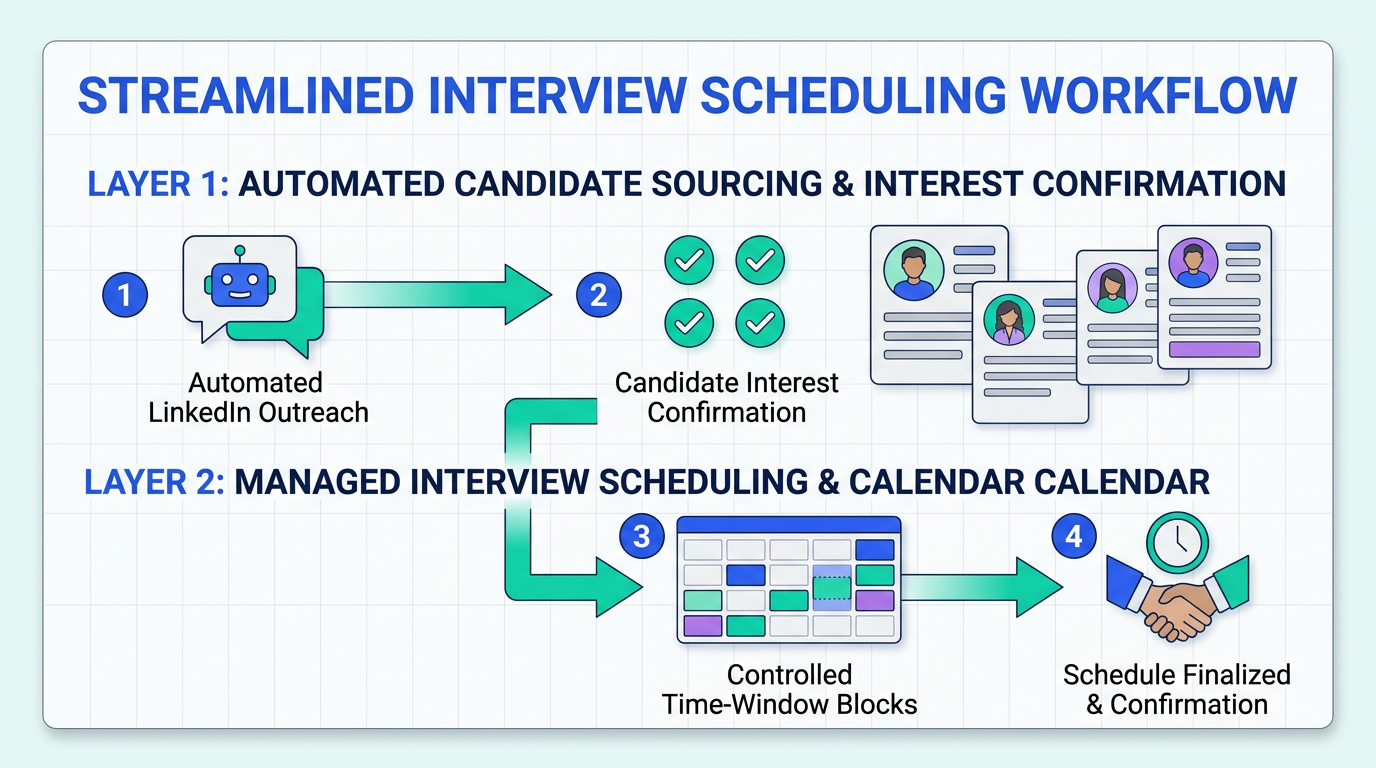
An interview scheduling app delivers the most value when it removes coordination friction while keeping candidates motivated to show up and move forward. In our recruiting operations tests, the biggest time sink was not the calendar itself, it was the human back and forth that happens before a candidate is truly ready to schedule. The practical fix is a two layer workflow: first, automate outreach and basic interest confirmation; second, schedule only qualified and interested candidates with clear time windows, confirmations, and reminders. This article explains how to build that workflow, when scheduling programs for small business can stay simple, and when a calendar online free setup is enough.
Key Takeaways
- Scheduling is a motivation problem, not just a calendar problem: candidates drop when the process feels slow, unclear, or overly controlling.
- Use a two layer workflow: automate interest confirmation first, then schedule only candidates who opt in to interview.
- Small teams can start simple: a calendar online free tool plus clear rules can work for low volume hiring.
- Scale requires automation: when you manage multiple roles or time zones, you need consistent messaging, reminders, and handoffs.
- StrategyBrain AI Recruiter reduces pre scheduling work: it automates LinkedIn outreach, answers candidate questions, confirms interview interest, and collects résumés and contact details before you send a scheduling link.
- Compliance and trust are part of the workflow: define what data you collect, why you collect it, and how it is protected.
Why motivation matters in scheduling
We revisited a well known idea from career analyst Dan Pink on the “puzzle of motivation.” The core point is that traditional reward and control systems do not always produce the outcomes managers expect. In hiring, the parallel is straightforward: if your process relies on pushing candidates through rigid steps, you can unintentionally reduce engagement.
Interview scheduling is where this shows up first. Candidates interpret delays, repeated rescheduling, and unclear expectations as signals about the role and the company. Even when you use an interview scheduling app, the experience can still feel slow if the candidate has to wait days for a response or repeat the same information.
So the goal is not only to “book a slot.” The goal is to create a workflow that supports autonomy, clarity, and momentum. That is why the best scheduling programs for small business are the ones that reduce uncertainty and keep the candidate moving forward with minimal friction.
A practical interview scheduling workflow
Below is the workflow we use when we want both speed and consistency. It is tool agnostic, meaning you can implement it with a calendar online free setup or a full recruiting stack.
Step 1: Define what “ready to schedule” means
Before you send any scheduling link, define the minimum information you need. For example, role interest confirmed, location and time zone confirmed, and résumé received. This prevents calendar clutter and reduces no show risk.
Step 2: Automate the pre scheduling conversation
This is where most teams lose time. StrategyBrain AI Recruiter is designed to handle this stage on LinkedIn by automatically connecting with candidates, introducing the opportunity, answering questions about the role, company, compensation, and benefits, and confirming whether the candidate wants to interview. When the candidate opts in, it collects résumés and contact details so the recruiter can move directly to scheduling.
Step 3: Offer time windows, not unlimited access
Unlimited availability looks convenient, but it often creates operational chaos. Instead, publish controlled windows per interviewer and per stage. This is especially important for scheduling programs for small business where one person may be both the recruiter and the hiring manager.
Step 4: Confirm, remind, and reduce reschedules
Use confirmations and reminders that include the interview format, duration, and what to prepare. If your interview scheduling app supports it, add a reschedule policy and a cutoff time. The point is to reduce ambiguity, not to punish candidates.
Step 5: Close the loop after the interview
Motivation drops when candidates feel ignored. Even a short follow up message that sets expectations for next steps improves trust. If you are using AI Recruiter for LinkedIn communication, you can keep candidate messaging responsive across time zones because it supports 24/7 multilingual communication.
5 ways to run scheduling (from simple to scalable)
Method 1: Calendar online free plus manual coordination
- Create a dedicated interview calendar with working hours and buffer time.
- Send 3 specific time options to the candidate instead of asking “when are you free.”
- Confirm time zone and format in the same message.
- Send a reminder 24 hours before the interview.
Features
- Lowest cost and fastest to start
- Works for low volume hiring
- Easy to manage for a single interviewer
Limitations
- High manual effort as volume increases
- Inconsistent candidate experience across recruiters
- More risk of missed messages and delays
Best for
- Founders hiring for 1 role at a time
- Teams running fewer than 5 interviews per week
Method 2: Interview scheduling app with self serve booking
- Define interview types such as screening, hiring manager, and final round.
- Set availability rules including buffers and minimum notice.
- Use automated confirmations with location and preparation notes.
- Track reschedules and adjust windows if needed.
Features
- Reduces email ping pong
- Standardizes the booking experience
- Improves visibility for small teams
Limitations
- Does not solve pre scheduling qualification
- Still requires fast candidate communication to keep momentum
Best for
- Scheduling programs for small business that need consistency
- Teams coordinating across 2 to 5 interviewers
Method 3: ATS based scheduling for structured pipelines
- Map stages to your hiring process and define stage owners.
- Require stage entry criteria such as résumé received and interest confirmed.
- Use templates for invites, reminders, and follow ups.
- Audit time to schedule weekly to find bottlenecks.
Features
- Centralizes candidate records and scheduling
- Improves reporting and compliance
- Supports multi role hiring
Limitations
- Setup and process discipline required
- Candidate engagement still depends on response speed
Best for
- Teams hiring for multiple roles at once
- Organizations that need audit trails
Method 4: Add StrategyBrain AI Recruiter before scheduling
- Provide your LinkedIn account and role details including company info, compensation, benefits, and candidate search criteria.
- Let AI Recruiter run outreach and Q&A so candidates get timely answers and clear next steps.
- Confirm interview interest and collect résumé plus contact details from candidates who opt in.
- Send your interview scheduling app link only to interested candidates, with the right stage and time windows.
Features
- Automates initial LinkedIn outreach and follow up
- Supports 24/7 multilingual candidate communication
- Can manage more than 100 LinkedIn accounts for scalable recruiting teams
Limitations
- AI Recruiter confirms willingness to interview but does not decide final résumé fit, recruiters still review résumés
- Requires clear role information to avoid inconsistent messaging
Best for
- Teams that need to reduce manual LinkedIn recruiting work
- Global hiring across time zones and languages
- Small businesses that want enterprise level responsiveness without adding headcount
Method 5: Hybrid model for high volume hiring
- Use AI Recruiter for outreach and interest confirmation to keep candidate flow consistent.
- Route candidates into a structured pipeline where each stage has entry criteria.
- Use scheduling automation for each stage with controlled windows and reminders.
- Review weekly metrics such as time from first message to scheduled interview.
Features
- Balances speed with process control
- Reduces recruiter workload while keeping human decision making where it matters
- Improves candidate experience consistency
Limitations
- Requires clear ownership across tools and stages
- Needs periodic message and workflow reviews to stay accurate
Best for
- Organizations scaling hiring across multiple recruiters
- Teams that want predictable scheduling outcomes
Quick comparison
| Method | Setup time | Ongoing effort | Best for |
|---|---|---|---|
| Calendar online free plus manual coordination | 30 to 60 minutes | High | Very low volume hiring |
| Interview scheduling app self serve booking | 1 to 3 hours | Medium | Consistent scheduling for small teams |
| ATS based scheduling | 1 to 3 days | Medium | Structured pipelines and reporting |
| AI Recruiter before scheduling | Same day if role details are ready | Low to medium | Reducing pre scheduling work and improving responsiveness |
| Hybrid model | 3 to 7 days | Low | High volume and multi recruiter teams |
Copyable checklist for an interview scheduling app rollout
- Define interview stages and owners
- Write stage entry criteria such as interest confirmed and résumé received
- Set availability windows, buffers, and minimum notice
- Standardize invite text with time zone, duration, and format
- Add reminders and a reschedule policy
- Decide what data you collect and how you protect it
- If using StrategyBrain AI Recruiter, load role details and candidate criteria before outreach
- Review weekly: time to schedule, no show rate, and candidate response time
FAQ
What is an interview scheduling app?
An interview scheduling app is software that lets candidates and interviewers book interview times based on availability rules. It typically automates confirmations, reminders, and rescheduling so recruiters spend less time coordinating.
When is a calendar online free tool enough?
A calendar online free setup can be enough when you run low volume hiring and have one interviewer. Once you coordinate across multiple interviewers, time zones, or stages, the manual effort usually becomes the bottleneck.
How do scheduling programs for small business reduce no shows?
They reduce no shows by sending clear confirmations and reminders that include time zone, duration, and format. The best workflows also reduce delays before scheduling so candidates do not lose momentum.
How does StrategyBrain AI Recruiter fit into scheduling?
StrategyBrain AI Recruiter handles the pre scheduling work on LinkedIn by automating outreach, answering candidate questions, confirming interview interest, and collecting résumés and contact details. Recruiters then schedule only the candidates who opt in to interview.
Does AI Recruiter decide if a candidate is qualified?
No. AI Recruiter identifies willingness to communicate or interview and collects the information needed to proceed. Final qualification against job requirements is completed by the recruiter after reviewing the résumé.
Can AI Recruiter communicate in multiple languages?
Yes. AI Recruiter supports 24/7 multilingual candidate communication, which helps when candidates and recruiters are in different time zones or prefer different languages.
How does AI Recruiter collect résumés and contact details?
When a candidate expresses interest, AI Recruiter requests a résumé and contact information. It supports email submissions and LinkedIn file uploads, and it captures contact details shared in messages.
What should I standardize first in my scheduling workflow?
Standardize stage definitions, entry criteria, and the invite message template. Those three items reduce confusion and make your interview scheduling app easier to operate consistently.
Conclusion
The best interview scheduling app workflow is the one that protects candidate motivation while removing operational friction. Start with clear stages and controlled availability, then automate confirmations and reminders. If your biggest bottleneck is the pre scheduling back and forth, add automation that confirms interest and collects the basics before you send a booking link. For teams hiring on LinkedIn, StrategyBrain AI Recruiter can handle outreach, Q&A, interest confirmation, and résumé collection so your calendar is used for interviews, not for chasing replies.
Next step: choose the simplest setup that matches your hiring volume, then run the checklist above for a one week rollout and review your time to schedule.















