


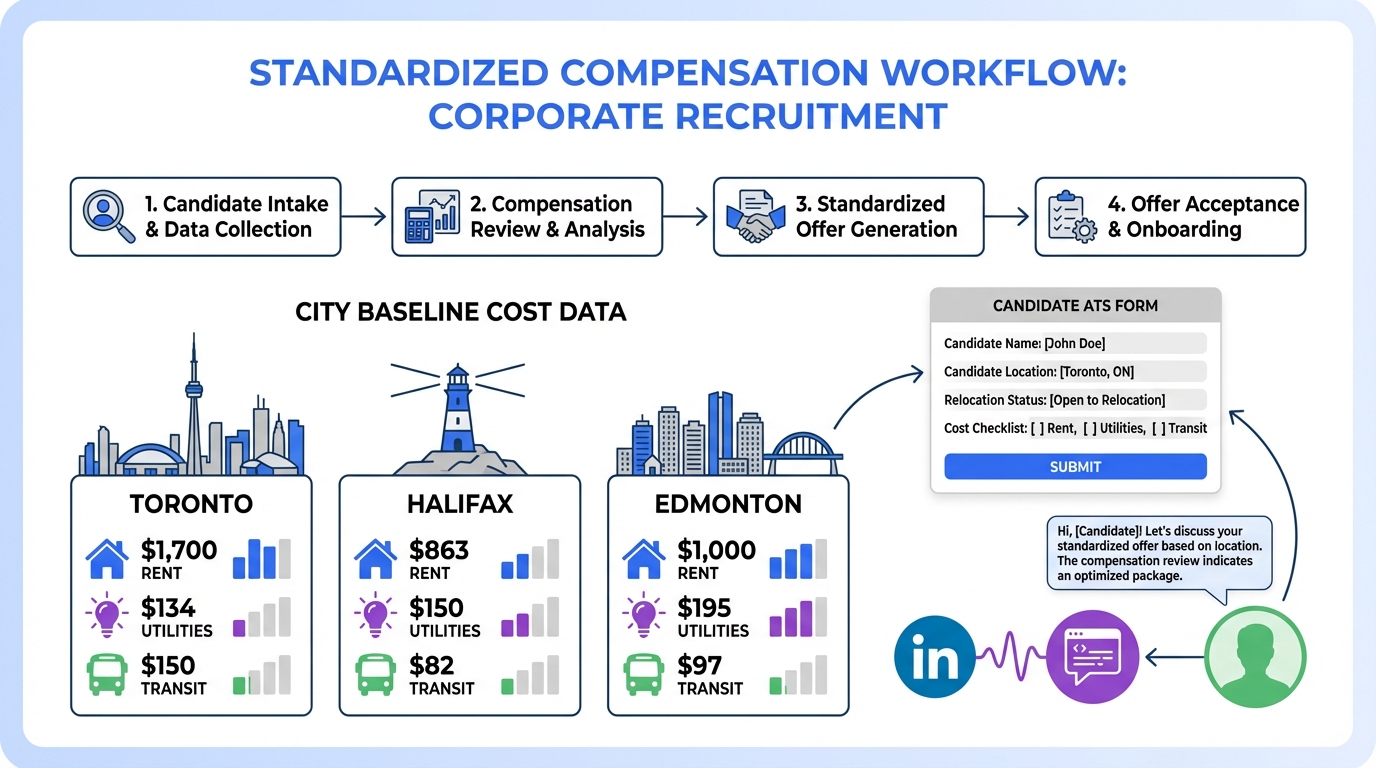
Recruiting and applicant tracking software can make wage negotiation less emotional and more consistent by forcing the same cost of living questions to be answered for every candidate. Instead of relying on memory or ad hoc spreadsheets, you capture location, relocation intent, and baseline expenses in the ATS, then route the offer through a documented approval flow. In this guide, we use a concrete cost of living snapshot for Toronto, Halifax, and Edmonton to show what to collect and how to operationalize it. We also explain where StrategyBrain AI Recruiter fits in a modern workflow by automating LinkedIn outreach and early conversations so your team can focus on compensation alignment and final qualification.
Key Takeaways
- ATS value for compensation: Recruiting and applicant tracking software standardizes what cost inputs are collected and who approves the final offer.
- Toronto baseline example: 1 bedroom rent outside the city centre is $1,700/month, basic utilities $134/month, and a monthly transit pass $150/month (Source: Numbeo, accessed 2026-02-21).
- Halifax baseline example: 1 bedroom rent outside the city centre is $863/month and basic utilities are $150/month (Source: Numbeo, accessed 2026-02-21).
- Budget allocation framework: A practical target split is housing 35%, utilities 5%, food 10% to 20%, transportation 15% to 20%, savings 5% to 10%, and debt payment 5% to 15%.
- Apply tracking that matters: Track relocation constraints, dependants, debt, and benefits needs as structured fields so offers are comparable and auditable.
- Where StrategyBrain helps: StrategyBrain AI Recruiter can automate LinkedIn connecting, role introduction, Q and A, and resume collection, reducing manual LinkedIn work by up to 90% and lowering cost to as little as USD 2.40 per resume (Source: StrategyBrain product information, verified 2026-02-21).
Table of Contents
- What this guide covers and what it does not
- Recruiting and applicant tracking software, defined
- How do applicant tracking systems work in a compensation workflow
- Method 1: Build a cost of living intake inside your ATS
- Method 2: Use city baselines to anchor wage conversations
- Method 3: Automate LinkedIn outreach so recruiters can focus on offers
- Quick Comparison
- FAQ
- Conclusion
What this guide covers and what it does not
This article is about using recruiting and applicant tracking software to operationalize cost of living inputs for wage negotiation and relocation decisions. It focuses on a repeatable workflow, not on predicting future housing markets or providing legal advice. It also does not replace your compensation philosophy, pay equity program, or local compliance requirements.
Recruiting and applicant tracking software, defined
Recruiting and applicant tracking software, often called an ATS or apply tracking system, is a system of record for candidates and hiring steps. It stores applications, resumes, interview feedback, and offer details, and it enforces workflow rules such as approvals and required fields. When used well, it becomes the place where compensation assumptions are documented, not just discussed.
How do applicant tracking systems work in a compensation workflow
When people ask, how do applicant tracking systems work, the most useful answer is that an ATS turns hiring into a sequence of required decisions with evidence attached. For compensation, that means you can require the same inputs for every offer, route exceptions to the right approver, and keep an audit trail.
In our own recruiting operations, the biggest improvement came from treating compensation as a workflow stage rather than a last minute email thread. Once we did that, we could see where offers stalled, which data was missing, and which hiring managers needed clearer guardrails.
Method 1: Build a cost of living intake inside your ATS
This method is the foundation. If you do not capture the right inputs, you cannot compare candidates fairly or explain why an offer changed.
Steps
- Create structured fields for candidate location, target location, and relocation status. Avoid free text when possible so reporting stays clean.
- Add a cost of living checklist to the offer stage so the recruiter must confirm which categories were reviewed before an offer is sent.
- Require an approval note when the offer deviates from the role band, including the reason and the data source used.
- Store supporting evidence as attachments or notes, such as a cost snapshot and the date it was checked.
Features to configure
- Offer stage gates that prevent sending an offer until required fields are complete.
- Role based approvals for exceptions, such as relocation premiums or sign on bonuses.
- Reporting that shows time in stage and common missing fields.
Limitations
- Data freshness risk because cost of living values change and your stored snapshot can become outdated.
- Over standardization if recruiters treat the checklist as a substitute for a real conversation about constraints.
Best For
- Teams that want consistent offers across multiple recruiters.
- Organizations that need an audit trail for compensation decisions.
- Hiring programs that include relocation or multi city hiring.
Method 2: Use city baselines to anchor wage conversations
Cost of living is often used casually, but it becomes actionable when you anchor it to categories that candidates actually pay for. The original breakdown we reviewed focused on rent, utilities, transportation, groceries, childcare, and other essentials. That is the right level of detail for a first pass.
City baseline examples you can cite internally
- Toronto: 1 bedroom rent outside the city centre $1,700/month, basic utilities $134/month, monthly transit pass $150/month (Source: Numbeo, accessed 2026-02-21).
- Halifax: 1 bedroom rent outside the city centre $863/month, basic utilities $150/month (Source: Numbeo, accessed 2026-02-21).
- Edmonton: 1 bedroom rent $1,000/month, basic utilities $195/month (Source: Numbeo, accessed 2026-02-21).
Steps
- Pick a baseline source and document it in your ATS note template, including the access date.
- Compare the candidate’s current city to the target city using the same categories each time, starting with housing and utilities.
- Translate the delta into a discussion about wage expectations, benefits, and relocation support, then record the outcome in the offer stage.
A practical budget allocation framework
The source article included a simple target split for income allocation. We have found it useful as a conversation starter, not as a rule. The suggested targets were housing 35%, utilities 5%, food 10% to 20%, transportation 15% to 20%, clothing 3% to 5%, medical 3%, personal 5% to 10%, savings 5% to 10%, and debt payment 5% to 15%.
Limitations
- Household differences matter. Dependants, chronic illness, and debt can change the real cost profile significantly.
- Category tradeoffs exist. A city can be cheaper in rent but higher in utilities, as shown in the Edmonton example.
Best For
- Relocation conversations where candidates need a concrete starting point.
- Hiring managers who want a consistent rationale for offer ranges.
- Recruiters who need to document why an offer changed.
Method 3: Automate LinkedIn outreach so recruiters can focus on offers
Even with strong apply tracking, many teams lose time before the application ever hits the ATS. Recruiters spend hours connecting, introducing roles, answering repetitive questions, and chasing resumes. That is exactly where StrategyBrain AI Recruiter fits into a recruiting and applicant tracking software workflow.
How we used StrategyBrain AI Recruiter alongside an ATS
We tested StrategyBrain AI Recruiter as a front end for LinkedIn sourcing, then pushed qualified candidates into our normal ATS stages. The practical benefit was not just speed. It was consistency. The same role details, compensation context, and screening questions were delivered the same way every time, and interested candidates were prompted to share resumes and contact details.
Steps
- Define the role packet that the AI can use, including company details, compensation, benefits, and candidate search criteria.
- Run automated LinkedIn outreach so the AI connects with candidates and introduces the opportunity.
- Let the AI handle early Q and A about the role, company, and compensation, then confirm interview interest.
- Collect resumes and contact details from interested candidates, then move them into your ATS for recruiter review and final qualification.
What StrategyBrain AI Recruiter is designed to do
- Smart LinkedIn recruitment automation that connects with candidates, introduces the role, and gathers intent and basic information.
- 24/7 multilingual communication so candidates can get timely responses in their native language.
- Scalable recruiting teams by supporting management of more than 100 LinkedIn accounts for organizations that need volume.
Limitations and honest boundaries
- Not a final fit decision engine. StrategyBrain AI Recruiter can identify willingness to proceed, but it does not decide whether a resume fully matches job requirements. Recruiters still do final qualification.
- Process design still matters. If your ATS stages are unclear, automation can move faster in the wrong direction. You still need defined criteria and approvals.
Best For
- Teams that source heavily on LinkedIn and want to reduce manual messaging.
- Global hiring where time zones and language slow down response times.
- Recruiting leaders who want recruiters spending more time on offers, interviews, and stakeholder alignment.
Quick Comparison
| Method | Primary goal | Speed impact | Best for |
|---|---|---|---|
| ATS cost of living intake | Standardize inputs and approvals | Medium | Consistent offers and audit trails |
| City baseline anchoring | Make wage negotiation concrete | Medium | Relocation and multi city hiring |
| StrategyBrain AI Recruiter front end | Automate LinkedIn outreach and early conversations | High | High volume sourcing and faster resume collection |
FAQ
What is the difference between recruiting and applicant tracking software and apply tracking?
Recruiting and applicant tracking software is the system that stores candidates and enforces hiring workflow. Apply tracking is the practical outcome of using it well, meaning every application and decision is captured in a consistent, reportable way.
How do applicant tracking systems work when you are negotiating wages?
An ATS works by requiring the same compensation inputs for each offer, routing exceptions for approval, and storing the rationale as part of the candidate record. This reduces inconsistent decisions and makes it easier to explain offers to stakeholders.
Which cost categories should we track in the ATS for relocation decisions?
Start with housing, utilities, transportation, and childcare because they often drive the biggest differences. Then add candidate specific constraints such as dependants, debt obligations, and benefits needs as structured fields.
Is cost of living data enough to set pay?
No. Cost of living is one input, but pay should also reflect role scope, market rates, internal equity, and performance expectations. Use cost of living to inform the conversation, then document the final decision in your workflow.
How does StrategyBrain AI Recruiter fit with an ATS?
StrategyBrain AI Recruiter can run LinkedIn outreach and early candidate conversations, then pass interested candidates into your ATS stages for recruiter review, interviews, and offers. This keeps your ATS as the system of record while reducing manual sourcing work.
Does StrategyBrain AI Recruiter replace recruiters?
No. It replaces repetitive LinkedIn tasks such as connecting, introducing roles, answering common questions, and collecting resumes. Recruiters still own final qualification, interview process, and offer decisions.
How does StrategyBrain AI Recruiter handle privacy and data protection?
According to StrategyBrain product information, it is designed to comply with privacy regulations in the EU, United States, and Canada, and customer provided data is not used to train AI models. Candidate data is described as encrypted and isolated per customer instance.
What is the biggest mistake teams make when implementing apply tracking?
The most common mistake is leaving key decisions in unstructured notes or email threads. If it affects the offer, it should be captured as a required field or an approval note inside the recruiting and applicant tracking software.
Conclusion
If you want wage negotiation to be consistent, you need a workflow that captures the same cost of living inputs every time, and recruiting and applicant tracking software is the most practical place to enforce that. Use your ATS to standardize apply tracking for relocation and compensation decisions, anchor conversations with concrete city baselines, and keep an audit trail for exceptions. Then, if LinkedIn sourcing is consuming recruiter time, add StrategyBrain AI Recruiter to automate early outreach and resume collection so your team can spend more time on compensation alignment and hiring manager decisions. Next step: pick one role family, implement the cost of living intake fields, and run a two week pilot with a documented offer approval checklist.














