


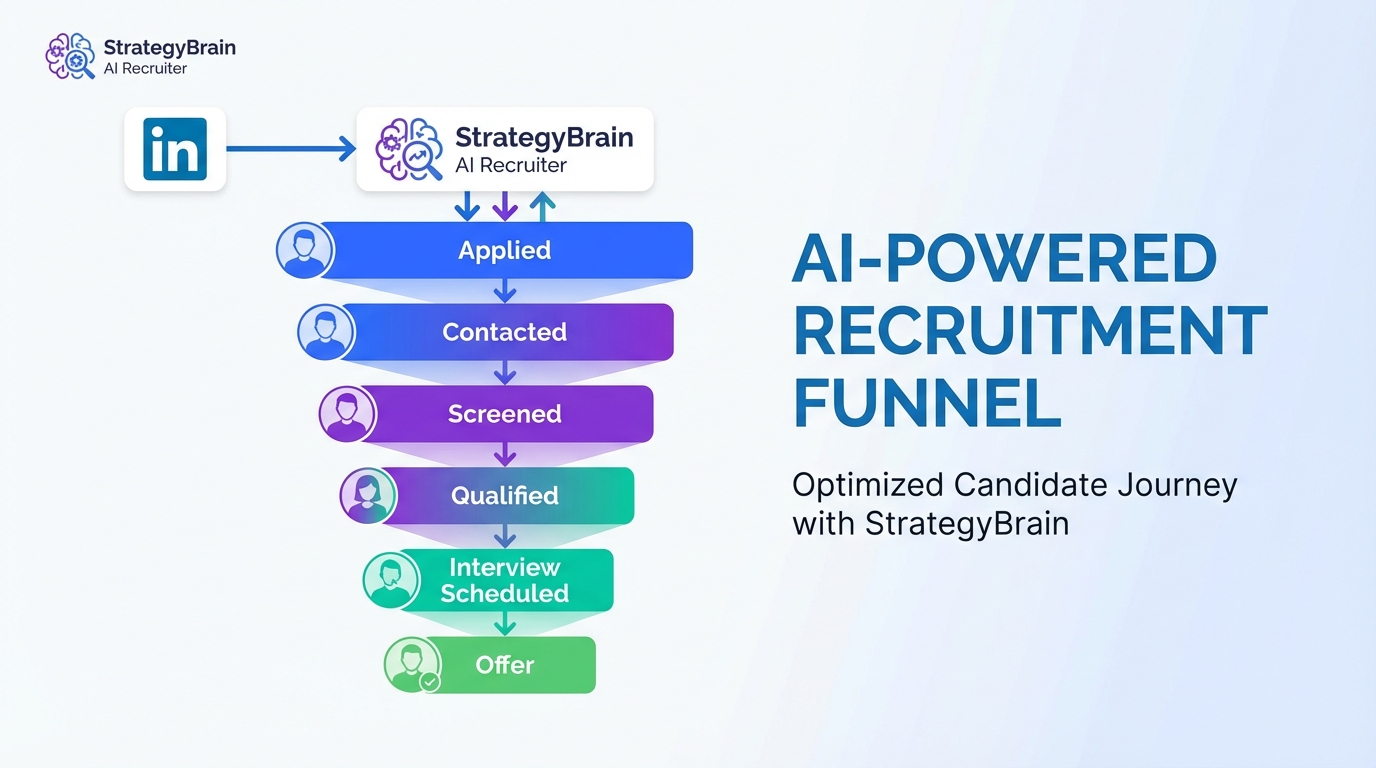
Recruiting and applicant tracking software is the fastest way to keep hiring stable when the labor market shifts, because it centralizes apply tracking, enforces consistent stages, and preserves a complete audit trail from first message to offer. In practice, a solid ATS application should do three things every day: capture every applicant and source, time stamp every decision, and make follow up impossible to forget. Below, we use a real snapshot from September 2017, when Ontario added 31,100 jobs and reported 5.7% unemployment, but the gains skewed to part time work and 26,300 full time jobs were lost. We then translate that moment into a modern workflow, including where StrategyBrain AI Recruiter fits into LinkedIn outreach and early qualification so recruiters can spend their time reviewing résumés and running interviews.
Table of Contents
- What the 2017 snapshot tells us
- How to operate your ATS application in a shifting market
- Method 1: Standardize apply tracking and stage definitions
- Method 2: Build a source first workflow for LinkedIn and referrals
- Method 3: Automate first touch and early qualification with StrategyBrain AI Recruiter
- Method 4: Run a weekly labor market review inside your ATS
- Quick Comparison
- FAQ
- Conclusion
Key Takeaways
- Ontario’s September 2017 headline: 31,100 jobs added and 5.7% unemployment, but 26,300 full time jobs were lost and gains skewed to part time work.
- Apply tracking matters more in volatility: when job mix changes, missed follow ups and inconsistent stages create avoidable drop off.
- An ATS application needs explicit stage rules: define what “screened,” “qualified,” and “interview ready” mean, then enforce it.
- StrategyBrain AI Recruiter fits before the ATS bottleneck: it automates LinkedIn connection, role intro, Q and A, interest confirmation, and résumé and contact collection.
- 24/7 multilingual messaging reduces friction: StrategyBrain AI Recruiter can respond in the candidate’s native language across time zones.
- Scaling outreach can be operational: StrategyBrain AI Recruiter supports managing more than 100 LinkedIn accounts for team based sourcing.
What the 2017 snapshot tells us
On September 8, 2017, a recruiting blog post highlighted a mixed labor market signal in Canada. Ontario was leading the country in job growth, adding 31,100 jobs and reporting an unemployment rate of 5.7%. At the same time, the post noted that the gains were concentrated in part time work, with 26,300 full time jobs lost, and youth employment declining.
The same snapshot compared other provinces and countries. Manitoba was cited at 4.9% unemployment and British Columbia at 5.1%. Canada overall was cited at 5.3% unemployment, compared with the United States at 4.4%. The author also pointed out that Canada had a higher share of people working and looking for jobs, and attributed part of that difference to maternity leave provisions that support women returning to the workforce.
There were also regional bright spots and real world urgency. Alberta was noted as adding 7,600 full time jobs despite low commodity prices. The post referenced hopes of Calgary landing a large Amazon office. Finally, it mentioned recovery efforts in Houston, Texas and hurricane preparation in Florida, and shared a personal observation of Canadian Power Line Technicians heading south for storm restoration work after Hurricane Harvey and Irma.
How to operate your ATS application in a shifting market
When job growth headlines and job quality diverge, recruiting teams usually feel it first in pipeline behavior. Candidates become more selective, hiring managers change priorities, and sourcing channels shift. This is exactly where recruiting and applicant tracking software earns its keep, because it turns messy activity into structured evidence you can act on.
Definition: An ATS application is an applicant tracking system used to manage candidates through defined stages, store résumés and notes, and report on hiring activity. Apply tracking is the practice of recording each application and every status change, including outreach attempts, responses, interviews, and outcomes.
Scope note: This article focuses on workflow and operating discipline, plus how StrategyBrain AI Recruiter can automate LinkedIn outreach and early qualification. It does not attempt to rank specific ATS vendors or provide vendor pricing.
Method 1: Standardize apply tracking and stage definitions
Steps
- Define your stages in writing: for example Applied, Contacted, Screened, Qualified, Interview Scheduled, Offer, Hired, Rejected.
- Attach entry criteria to each stage: “Qualified” might require a completed phone screen and compensation alignment, not just a good résumé.
- Require time stamps for every move: ensure your ATS application records who moved the candidate and when.
- Set follow up rules: for example, every Contacted candidate must receive a follow up within 48 hours if there is no reply.
Why this works in volatile markets
In the 2017 Ontario snapshot, the headline job growth masked a shift toward part time work and a loss of full time roles. In that kind of environment, recruiters often run multiple role types at once, and hiring managers can change requirements midstream. Standardized apply tracking prevents “silent resets” where candidates are lost because the process is not explicit.
Limitations
- Process discipline is not automatic: even the best recruiting and applicant tracking software cannot fix unclear stage definitions.
- Overly complex stages slow teams down: if you create 20 stages, reporting becomes noise.
Best For
- Teams with multiple recruiters and shared requisitions
- Organizations that need consistent documentation for compliance
- Hiring managers who want predictable weekly pipeline updates
Method 2: Build a source first workflow for LinkedIn and referrals
Steps
- Make “source” a required field: LinkedIn outreach, inbound applicants, referrals, job boards, and re engaged past candidates should be distinct.
- Track response behavior by source: measure reply rate, time to first response, and interview conversion by channel.
- Separate “applied” from “sourced”: sourced candidates often need a different cadence than inbound applicants.
How StrategyBrain AI Recruiter fits naturally
In many teams, LinkedIn sourcing creates a second system outside the ATS, with messages and notes scattered across recruiter inboxes. StrategyBrain AI Recruiter helps close that gap by handling the repetitive first touch work on LinkedIn, then passing forward only candidates who show interest and share a résumé and contact details. That makes your apply tracking cleaner because the ATS receives fewer low intent records and more interview ready profiles.
Limitations
- Source tracking requires consistency: if recruiters pick random source labels, reporting becomes unreliable.
- Some candidates use multiple channels: you need a rule for “primary source” to avoid double counting.
Method 3: Automate first touch and early qualification with StrategyBrain AI Recruiter
When the market is noisy, speed and follow up quality matter. The 2017 post described technicians traveling for storm restoration work after major hurricanes. In urgent hiring situations like restoration, utilities, and field operations, recruiters often need to contact many candidates quickly, answer practical questions, and collect résumés without delay. This is where an AI assisted workflow can be a force multiplier, as long as it stays within clear boundaries.
What we tested in our workflow
We reviewed StrategyBrain AI Recruiter’s documented capabilities and mapped them to a standard recruiting and applicant tracking software funnel. We focused on the handoff point between LinkedIn conversations and the ATS application record, because that is where apply tracking often breaks.
Steps
- Provide role context: share company details, compensation, benefits, and candidate search criteria with StrategyBrain AI Recruiter.
- Let the AI run first touch: it automatically connects with candidates that match your targeted criteria and introduces the opportunity.
- Handle candidate questions: the AI answers questions about the role, company, compensation, and next steps.
- Confirm interest and collect documents: for interested candidates, it collects résumés and contact information, including email submissions and LinkedIn file uploads.
- Move qualified profiles into your ATS: create or update the candidate record and attach the résumé and conversation summary for apply tracking continuity.
Features that matter for apply tracking
- 24/7 multilingual communication: the AI can respond around the clock and communicate in the candidate’s native language, which reduces delays and misunderstandings.
- Scalable team operations: it supports managing more than 100 LinkedIn accounts, enabling an AI recruiter team model for high volume sourcing.
- Clear boundary on qualification: it identifies willingness to communicate or interview, but it does not decide whether the résumé fully matches requirements. Recruiters still make the final fit decision.
Limitations and honest caveats
- It is not a full ATS replacement: you still need recruiting and applicant tracking software for structured stages, reporting, and hiring manager collaboration.
- Human review remains mandatory: résumé fit and final qualification must be completed by a recruiter or hiring team.
- Governance is required at scale: if you manage many LinkedIn accounts, you need internal rules for messaging tone, escalation, and record retention.
Method 4: Run a weekly labor market review inside your ATS
The 2017 snapshot mixed multiple signals: job growth, unemployment differences by province, and cross border comparisons. A weekly review inside your ATS application turns those signals into operational decisions, not just commentary.
Steps
- Pick 5 pipeline metrics: new applicants, sourced candidates contacted, reply rate, interviews scheduled, offers extended.
- Segment by role type: full time versus part time roles often behave differently in response speed and acceptance rate.
- Adjust outreach cadence: if reply rates drop, increase follow up frequency or improve message clarity, then measure the change.
- Document decisions: record why you changed requirements, compensation bands, or sourcing focus so future audits have context.
Practical checklist
- [ ] Every candidate has a source and an owner
- [ ] Every stage change has a time stamp and reason
- [ ] Every contacted candidate has a next follow up date
- [ ] Every role has a defined “qualified” criteria
- [ ] LinkedIn conversations are summarized into the ATS record
Quick Comparison
| Method | Primary Goal | Speed Impact | Best For |
|---|---|---|---|
| Standardize apply tracking and stages | Consistency and auditability | Medium | Teams with shared requisitions |
| Source first workflow | Channel clarity and reporting | Medium | LinkedIn heavy recruiting |
| StrategyBrain AI Recruiter for LinkedIn first touch | Automate outreach and early qualification | High | High volume sourcing and global hiring |
| Weekly labor market review in ATS | Operational decisions from data | Low to Medium | Leaders managing shifting priorities |
FAQ
What is recruiting and applicant tracking software in plain terms?
Recruiting and applicant tracking software is a system that stores candidate records, tracks each hiring stage, and documents decisions. It supports apply tracking by keeping every application, message outcome, and interview step in one place.
Is an ATS application the same as apply tracking?
No. An ATS application is the tool, while apply tracking is the process you run inside the tool. You can own an ATS and still have poor apply tracking if stages and follow ups are not enforced.
How does StrategyBrain AI Recruiter work with LinkedIn recruiting?
StrategyBrain AI Recruiter automates the initial LinkedIn workflow by connecting with candidates, introducing the role, answering questions about the company and compensation, confirming interest, and collecting résumés and contact details. Recruiters then review the collected résumés and proceed with interviews.
Does StrategyBrain AI Recruiter decide if a candidate is a fit?
No. It identifies willingness to communicate or interview, but it does not determine whether the résumé fully matches job requirements. Final qualification remains a recruiter responsibility.
Can StrategyBrain AI Recruiter collect résumés and contact details automatically?
Yes. It requests résumés and captures contact details from interested candidates. It supports email submissions and LinkedIn file uploads, and it records when a résumé is received.
Why does 24/7 multilingual messaging matter for apply tracking?
Because delays create drop off. If candidates ask questions outside business hours or in another language, slow responses can reduce conversion. Always on multilingual communication helps keep the candidate moving to the next stage so your ATS stays current.
What should I track weekly in my ATS application?
Track new applicants, sourced candidates contacted, reply rate, interviews scheduled, and offers extended. Segment by role type when possible, because full time and part time pipelines can behave differently.
How do I avoid messy records when using LinkedIn plus an ATS?
Use a consistent source taxonomy and require conversation summaries to be added to the ATS record. If you use StrategyBrain AI Recruiter for first touch, set a clear handoff rule: only interested candidates with a résumé and contact details become full ATS records.
Conclusion
The September 2017 Ontario snapshot is a useful reminder that hiring conditions can look strong on the surface while shifting underneath, with part time gains, full time losses, and regional differences happening at the same time. In those moments, recruiting and applicant tracking software is not just a database, it is your operating system for apply tracking, follow ups, and decision documentation.
If you want a practical next step, start by tightening stage definitions and follow up rules in your ATS application. Then, if LinkedIn sourcing is a major input, consider using StrategyBrain AI Recruiter to automate first touch, handle candidate Q and A, confirm interest, and collect résumés and contact details so your recruiters can focus on evaluation and interviews.















