


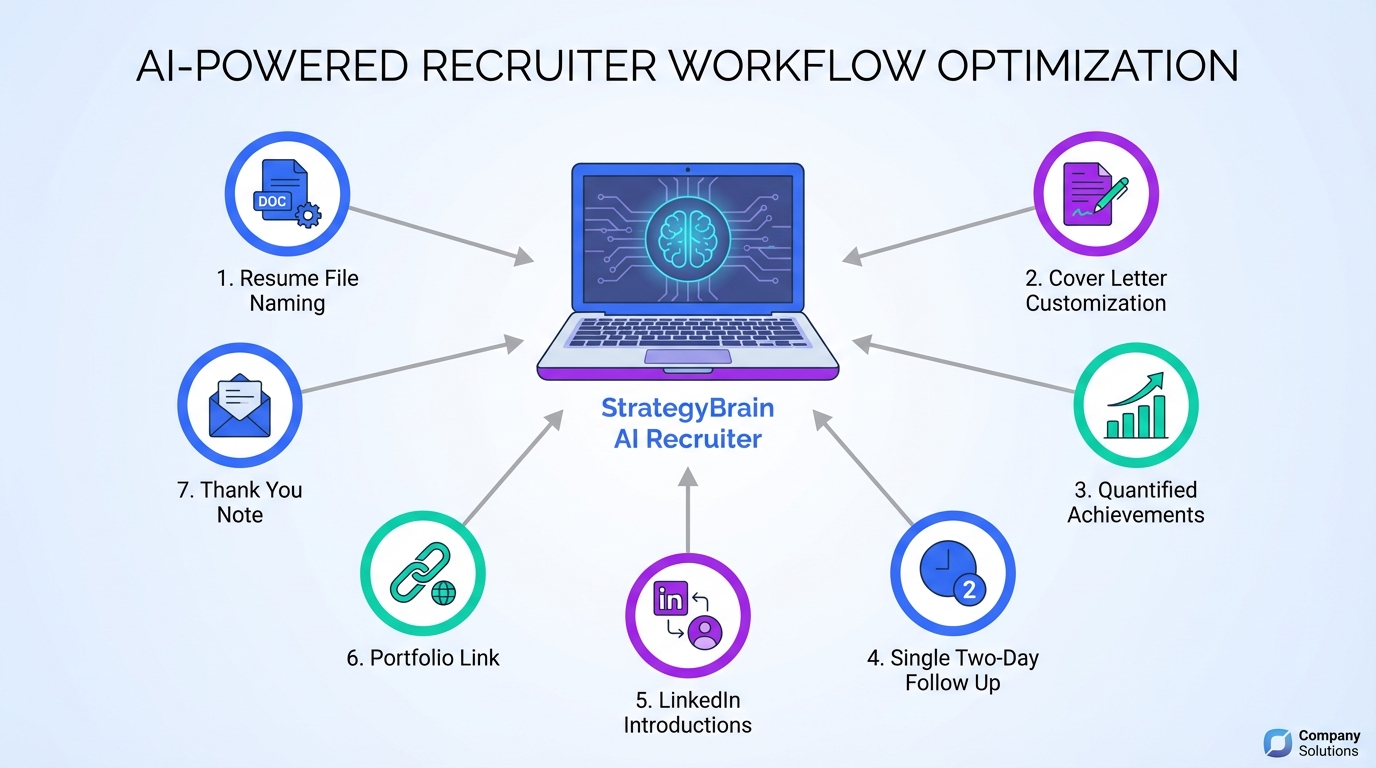
For recruitment online for recruiters, the fastest way to help candidates stand out is to standardize the basics that hiring teams actually see first: a clearly named resume file, a role specific cover letter, quantified achievements, and a single follow up message sent 2 days after applying. Then, use LinkedIn to activate warm introductions and close the loop with a short thank you note after interviews. This article turns 7 field tested tactics into a repeatable recruiter workflow, and it also explains how StrategyBrain AI Recruiter can handle the repetitive LinkedIn connecting, messaging, and follow up so you can focus on screening and closing for agency recruiter jobs and staffing agency recruiter jobs.
Key Takeaways
- File naming is a 30 second win: Rename “resume.doc” to “First Last – Target Role” so it is searchable and professional.
- Customization beats volume: A role specific cover letter signals intent and improves recruiter confidence in fit.
- Numbers create credibility: Add measurable outcomes like “Grew revenue by 15%” or “Reduced wait time by 30 seconds per call.”
- Follow up once: Send 1 message 2 days after applying, then stop to avoid negative signaling.
- LinkedIn introductions are leverage: Mutual connections can create a warm path to the hiring manager.
- Portfolios reduce uncertainty: A simple work sample link can outperform extra paragraphs of claims.
- StrategyBrain AI Recruiter can offload repetitive LinkedIn work: It can automate connecting, initial messaging, Q and A, and follow up so recruiters spend more time on screening and interviews.
Why these tactics matter in online recruiting
Online hiring funnels are noisy. Recruiters and hiring managers often scan quickly, and small frictions add up. A generic file name, an unquantified resume, or a vague cover letter can make a qualified candidate look risky. The goal is not to “game” the process. The goal is to make the candidate’s value easy to verify.
For recruiters working recruitment online for recruiters, especially in agency recruiter jobs, these tactics also reduce back and forth. When candidates present clear evidence and respond professionally, you can move faster from sourcing to shortlist.
Tactic 1: Give the resume file a name recruiters can search
We still see a surprising number of attachments named “resume.doc” or “cv.doc.” That creates confusion when multiple files are downloaded and forwarded internally.
Steps
- Rename the file before uploading so the name is meaningful outside the candidate’s computer.
- Use a consistent pattern such as “First Last – Job Title.”
- Optional branding line if it is accurate and short, for example “First Last – Sales Professional.”
Features
- Improves searchability in shared folders and ATS exports.
- Reduces recruiter handling time when forwarding to hiring managers.
- Signals attention to detail without extra words.
Limitations
- It will not fix a weak resume, but it prevents an avoidable first impression problem.
Best For
- Candidates applying to multiple roles in the same company.
- Recruiters managing high volume submissions.
Tactic 2: Write a customized cover letter that proves fit
A customized cover letter is not a list of skills. It is a short argument for why this candidate fits this role at this company. The fastest way to improve quality is to mirror the employer’s language about outcomes and values, then connect it to evidence.
Steps
- Read the job posting twice and highlight 3 outcomes the role is responsible for.
- Pick 2 matching achievements from the candidate’s experience that map to those outcomes.
- Write 1 paragraph on motivation that is specific to the company’s work, not generic enthusiasm.
Features
- Demonstrates intent and reduces “spray and pray” signals.
- Helps recruiters quickly understand fit beyond keywords.
- Creates a clean narrative for hiring manager review.
Limitations
- Customization takes time, so it is best used for priority roles.
Best For
- Competitive roles where many applicants meet baseline requirements.
- Career transitions where the resume alone may not explain the move.
Tactic 3: Quantify achievements with numbers and timeframes
Quantification is one of the simplest credibility upgrades. It helps recruiters and hiring managers visualize impact and compare candidates fairly.
Steps
- Identify 3 outcomes the candidate influenced, such as revenue, cost, time, quality, or risk.
- Add a number and unit like percent, dollars, seconds, or count.
- Add a timeframe such as “in 12 months” to make the result interpretable.
Examples you can reuse
- Grew revenue by 15%.
- Reduced call wait times by 30 seconds per call.
- Delivered 5 on time and under budget projects within 12 months.
Limitations
- Not every role has clean metrics. In that case, use counts, cycle time, or quality indicators that are defensible.
Best For
- Sales, operations, customer support, project delivery, and leadership roles.
Tactic 4: Follow up once, 2 days after applying
Following up signals interest, but repeated follow ups can backfire. A single message 2 days after applying is a practical balance.
Steps
- Wait 2 days after submission.
- Send 1 short email or message confirming interest and pointing to 1 relevant achievement.
- Stop after 1 follow up unless the recruiter invites further contact.
Recruiter note on automation
In high volume pipelines, follow up is where process breaks. This is also where StrategyBrain AI Recruiter can help on LinkedIn by handling initial outreach and timely follow ups 24 hours a day, so your team does not lose candidates simply because a message sat unanswered overnight.
Limitations
- Some employers have strict processes and may not respond to follow ups. The goal is professionalism, not pressure.
Best For
- Roles where the candidate is a strong match and wants to be remembered.
Tactic 5: Use mutual LinkedIn connections for introductions
Warm introductions can change response rates because they reduce uncertainty. If a candidate has a mutual connection with the hiring manager or team, a respectful request for an introduction can help.
Steps
- Identify the likely hiring manager or team lead on LinkedIn.
- Check for mutual connections the candidate genuinely knows.
- Ask for a simple introduction or a short recommendation message.
How StrategyBrain AI Recruiter fits without changing your voice
For recruiters, LinkedIn introductions are powerful but time consuming to manage at scale. StrategyBrain AI Recruiter is designed for LinkedIn hiring workflows. It can automatically connect with candidates that match your search criteria, introduce the opportunity, answer common questions about the role and compensation, confirm interview interest, and collect resumes and contact details. That means your human team can focus on the warm handoff and the interview process rather than repeating the same first messages across dozens of threads.
Limitations
- Introductions only work when the relationship is real. Avoid asking weak ties for favors.
Best For
- Senior roles and specialized searches where trust matters.
- Recruiters building pipelines for hard to fill roles.
Tactic 6: Include a portfolio link without creating friction
A portfolio is proof. It can be design work, writing, code, case studies, or project summaries. The key is to make it easy to access and easy to understand.
Steps
- Choose 3 to 7 samples that match the role.
- Add 1 line of context per sample describing the goal and the result.
- Place the link where it is visible such as the resume header and the cover letter.
Limitations
- Some employers cannot open external links due to security policies. In that case, include a short “selected work” section in the resume.
Best For
- Marketing, product, engineering, design, and communications roles.
Tactic 7: Send a thank you note after the interview
A thank you note is a low effort way to reinforce professionalism and interest. It does not need to be long.
Steps
- Send within 24 hours of the interview.
- Keep it short and reference 1 specific topic discussed.
- Confirm interest and appreciation for their time.
Template
Subject: Thank you
Thank you for your time today. It was great to meet you and learn more about the role and the team. I am excited about the possibility of contributing, especially around the priorities we discussed. Thank you again.
Limitations
- It will not override a poor interview, but it can break ties when candidates are close.
Best For
- Every interview, including recruiter screens and hiring manager rounds.
Quick Comparison
| Method | Time to implement | What it improves | Best for |
|---|---|---|---|
| Rename resume file | 30 seconds | Searchability and first impression | High volume applications |
| Customized cover letter | 20 to 40 minutes | Fit narrative and intent | Priority roles |
| Quantified achievements | 30 to 60 minutes | Credibility and comparability | Performance driven roles |
| Single follow up | 5 minutes | Visibility and responsiveness | Strong match candidates |
| LinkedIn introduction | 10 to 20 minutes | Trust and response rate | Specialized searches |
| Portfolio link | 60 to 120 minutes | Proof of work | Creative and technical roles |
| Thank you note | 5 minutes | Professionalism and recall | All interviews |
A recruiter workflow you can reuse
If you recruit online across multiple roles, consistency is your advantage. Here is a simple workflow we have used to coach candidates and reduce rework across the funnel.
Step by step
- Intake the role: Identify 3 outcomes and 5 must have skills from the job posting.
- Prepare the candidate package: Resume file name, quantified bullets, and a role specific cover letter.
- Submit and schedule follow up: Set a reminder for 2 days later for a single follow up message.
- Activate LinkedIn: Check for mutual connections and request an introduction when appropriate.
- Scale outreach responsibly: If your team is running many LinkedIn conversations, use StrategyBrain AI Recruiter to automate connecting, initial messaging, Q and A, and follow up, then have recruiters step in when candidates show interview intent and share resumes.
Quick checklist you can copy
- Resume file name uses “First Last – Target Role”
- Cover letter references company specifics and 2 matching achievements
- Resume includes at least 3 quantified outcomes with units and timeframes
- Follow up message scheduled for 2 days after submission
- LinkedIn mutual connection check completed
- Portfolio link included or “selected work” section added
- Thank you note template ready for interview stage
FAQ
What does “recruitment online for recruiters” mean in day to day work?
It means running sourcing, screening, and candidate communication through digital channels such as LinkedIn and online applications. The practical focus is reducing friction so qualified candidates are easy to identify, evaluate, and move to interview.
How many times should a candidate follow up after applying?
One follow up is usually enough. Send it 2 days after applying, keep it short, and avoid repeated messages unless the recruiter invites further contact.
What is the best resume file name format?
Use a clear pattern like “First Last – Job Title.” It helps recruiters and hiring managers find the right file quickly when multiple resumes are downloaded and shared.
How do I quantify achievements if I do not have sales numbers?
Use operational metrics such as cycle time, error rate, throughput, customer satisfaction, or project counts. Include a unit and a timeframe so the result can be interpreted.
How can LinkedIn help candidates stand out without spamming?
Use LinkedIn to find mutual connections and request a genuine introduction. Avoid mass messaging and keep outreach specific to the role and the relationship.
How does StrategyBrain AI Recruiter support LinkedIn recruiting?
StrategyBrain AI Recruiter automates the initial LinkedIn workflow: connecting with candidates that match your criteria, introducing the role, answering common questions, confirming interview interest, and collecting resumes and contact details. Recruiters then focus on reviewing resumes and running interviews.
Can StrategyBrain AI Recruiter replace recruiter judgment?
No. It can identify willingness to communicate and interview, but final qualification still requires a recruiter reviewing the resume and assessing fit against the job requirements.
Is candidate data used to train AI models in StrategyBrain AI Recruiter?
According to StrategyBrain product information, customer provided data is not used to train AI models and is used only to personalize communication for the customer’s AI instance. Recruiters should still follow their internal privacy policies and obtain proper authorization for account access.
Conclusion
Recruitment online for recruiters gets easier when you make candidate value obvious and verifiable. Start with the 30 second resume file rename, then add a customized cover letter, quantified achievements, a single follow up after 2 days, LinkedIn introductions, a simple portfolio, and a short thank you note after interviews.
Next step: turn the checklist in this guide into your team’s standard operating procedure. If your recruiters are spending too much time on repetitive LinkedIn outreach and follow up, evaluate how StrategyBrain AI Recruiter can automate the first touch and qualification conversations so your team can spend more time on screening, interviews, and closing.















