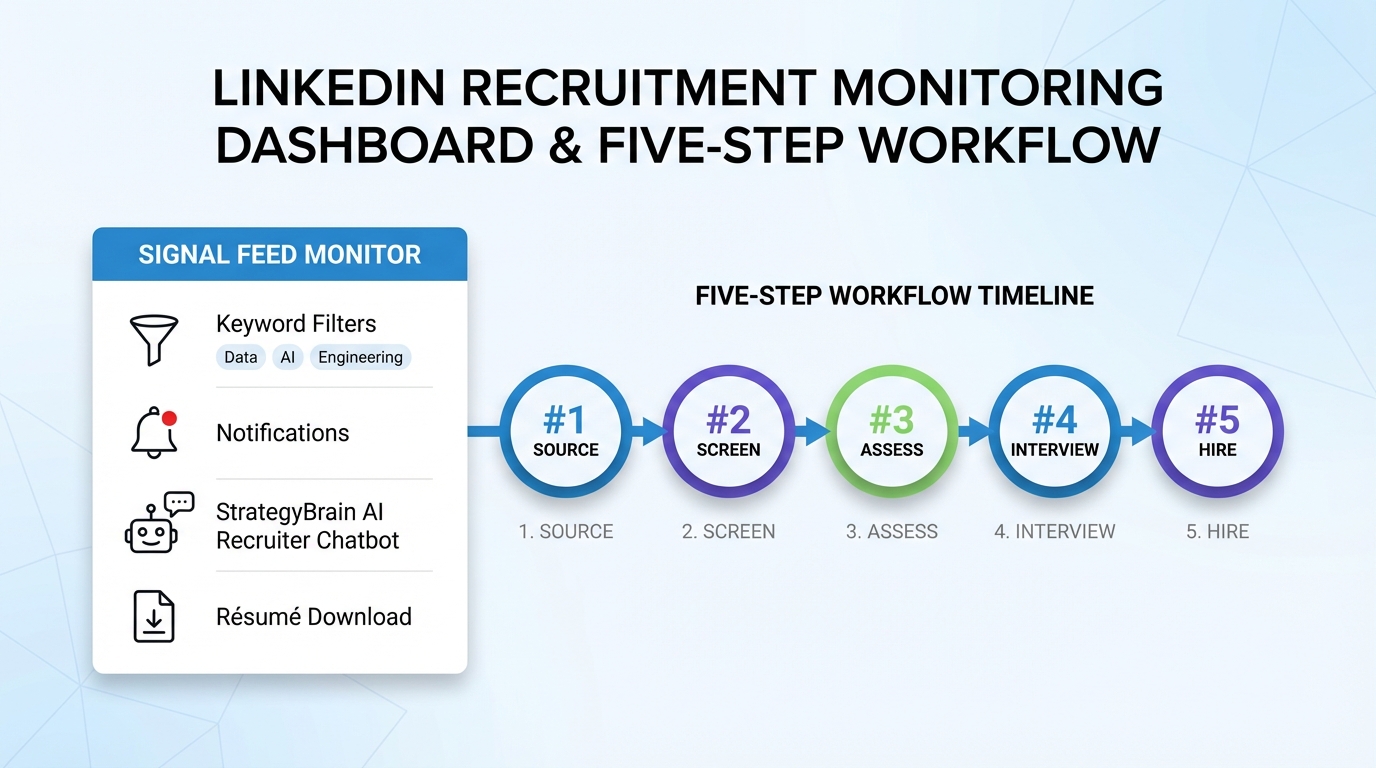
Recruitment monitoring works best when you treat LinkedIn like a live hiring signal feed: you define the signals you care about, set keyword based alerts, and review outcomes against recruitment metrics every month. The fastest setup we have used is a 5 step workflow: (1) set monitoring goals, (2) choose keywords, (3) configure LinkedIn saved searches and notifications, (4) add automation so candidate outreach and follow up do not stall, and (5) track results and refresh your alert rules. In our team’s day to day recruiting, StrategyBrain AI Recruiter fits naturally into step 4 because it can automatically connect with candidates, introduce the role, answer questions about compensation and benefits, confirm interview interest, and collect résumés and contact details while you keep control through monitoring and review.
Key Takeaways
- Recruitment monitoring starts with a goal: decide whether you are tracking candidate supply, competitor hiring moves, or role specific talent signals before you pick keywords.
- Use keyword groups: separate brand terms, role skills, location terms, and candidate intent phrases to reduce noise and improve relevance.
- LinkedIn saved searches are the baseline: they are the simplest way to monitor posts, jobs, and people results tied to your keywords.
- Automation prevents alert fatigue: StrategyBrain AI Recruiter can handle first touch outreach, Q&A, and résumé collection so alerts turn into pipeline movement.
- Track recruitment metrics weekly: response rate, résumé capture rate, and interview interest rate are more actionable than impressions alone.
- Refresh monthly: update keywords and notification frequency every 30 days to match hiring priorities and market shifts.
Table of Contents
- What recruitment monitoring means on LinkedIn
- Step 1: Set your monitoring goals
- Step 2: Build keyword lists that recruiters can maintain
- Step 3: Configure LinkedIn saved searches and notifications
- Step 4: Add automation so alerts create candidates, not just noise
- Step 5: Track results with recruitment metrics and refresh monthly
- Quick comparison: manual alerts vs automated recruiting workflow
- Copyable templates: hiring metrics examples and a monitoring checklist
- FAQ
- Conclusion
What recruitment monitoring means on LinkedIn
Recruitment monitoring is the ongoing process of watching for hiring signals and candidate signals, then turning those signals into actions that move your pipeline forward. On LinkedIn, those signals usually come from posts, job changes, job postings, company updates, and candidate engagement patterns.
This guide focuses on monitoring you can do with LinkedIn saved searches and notifications, plus an automation layer for outreach and follow up. It does not cover scraping, bypassing platform rules, or any workflow that requires collecting data without consent.
Step 1: Set your monitoring goals
Before you touch keywords, decide what you want alerts to do for your hiring team. When we audit alert setups, most failures come from mixing too many goals into one alert stream, which creates noise and slows response time.
Choose 1 primary goal per alert stream
- Candidate discovery: surface people who match role skills, titles, and locations.
- Candidate intent: detect signals like “open to work” style language or job search discussions.
- Market and competitor monitoring: track hiring announcements, team expansions, and role launches.
- Employer brand monitoring: track mentions of your company, leaders, and employee advocacy posts.
Define what “success” looks like
Pick 2 to 3 recruitment metrics you will review weekly. If you need a starting point, use these hiring metrics examples:
- Candidate response rate: replies divided by outreach messages sent, measured weekly.
- Interview interest rate: candidates who confirm interest divided by candidates who replied, measured weekly.
- Résumé capture rate: résumés received divided by candidates who confirmed interest, measured weekly.
Step 2: Build keyword lists that recruiters can maintain
Keywords are the control surface for recruitment monitoring. The goal is not “more keywords.” The goal is keyword groups that map to a hiring question, so you can refine them without breaking the system.
Use a keyword matrix (simple, repeatable)
| Keyword category | Examples | Recruitment monitoring purpose |
|---|---|---|
| Role and skill terms | Job titles, core skills, certifications | Find candidates and relevant discussions tied to the role |
| Location and work model | City, region, “remote”, “hybrid” | Keep alerts aligned with where you can hire |
| Company and brand terms | Company name, leadership names, product names | Monitor employer brand and inbound interest signals |
| Candidate intent phrases | “open to new opportunities”, “looking for”, “available” | Spot candidates who may respond faster to outreach |
Noise control rules we use in practice
- Keep each alert stream under 15 keywords so you can diagnose what is working.
- Separate monitoring from outreach so you do not message candidates based on low confidence signals.
- Review keywords every 30 days and remove terms that generate irrelevant results.
Step 3: Configure LinkedIn saved searches and notifications
LinkedIn saved searches and notifications are the baseline for recruitment monitoring because they are built into the platform and easy to maintain. The key is to configure them so you get actionable alerts, not constant interruptions.
Steps
- Run a LinkedIn search using your keyword group and filters that match your hiring scope, such as location and role level.
- Save the search so you can return to it without rebuilding filters each time.
- Set notification preferences to match urgency. Use immediate notifications only for time sensitive roles.
- Create separate saved searches for different goals, such as candidate discovery versus competitor hiring signals.
Recommended notification cadence
| Alert type | Recommended cadence | When it fits |
|---|---|---|
| Email digest | Daily | Most roles and ongoing pipeline building |
| Push notifications | Immediate | Hard to fill roles or urgent hiring spikes |
| Network activity summaries | Weekly | Employer brand monitoring and relationship maintenance |
Step 4: Add automation so alerts create candidates, not just noise
Alerts tell you what is happening. They do not guarantee follow up. In our experience, the gap between “we saw the signal” and “we started a conversation” is where pipelines stall, especially across time zones.
This is where StrategyBrain AI Recruiter can be used as an execution layer inside your recruitment monitoring workflow. Instead of treating automation as a separate project, we connect it to the same keyword and role definitions you use for monitoring.
What StrategyBrain AI Recruiter can automate on LinkedIn
- Candidate connection requests based on your targeted search criteria.
- Role introduction that explains the opportunity and checks fit at a high level.
- Candidate Q&A about the role, company, compensation, and benefits using the information you provide.
- Interest confirmation to identify candidates willing to proceed.
- Résumé and contact collection from interested candidates so recruiters can move to screening and interviews.
How we set it up (practical sequence)
- Define the role packet with company details, compensation, benefits, and candidate search criteria.
- Align monitoring keywords to the role packet so alerts and outreach target the same talent pool.
- Set follow up expectations so candidates get timely responses even outside recruiter working hours.
- Review collected résumés and contact details and move qualified candidates to interviews.
Limitations and how we handle them
- Automation does not replace final qualification: StrategyBrain AI Recruiter can confirm interest and collect résumés, but recruiters still decide whether the résumé matches job requirements.
- Monitoring still matters: alerts help you spot shifts in candidate supply and competitor hiring, which improves how you tune outreach.
- Compliance is non negotiable: keep workflows aligned with privacy and data protection expectations. StrategyBrain states customer provided data is not used to train AI models and credentials are encrypted and isolated per user.
Step 5: Track results with recruitment metrics and refresh monthly
Recruitment monitoring only pays off when you close the loop with measurement. We recommend a weekly review for execution metrics and a monthly review for keyword and notification tuning.
Weekly scorecard (copyable)
| Recruitment metric | Definition | Why it matters |
|---|---|---|
| Response rate | Replies ÷ outreach messages sent | Shows whether targeting and messaging are resonating |
| Interview interest rate | Interested candidates ÷ candidates who replied | Shows whether the role pitch and Q&A are effective |
| Résumé capture rate | Résumés received ÷ interested candidates | Shows whether you are converting interest into a screenable profile |
| Time to first response | Median minutes from candidate message to first reply | Strong predictor of conversation continuation, especially across time zones |
Monthly refresh checklist
- Remove keywords that generate irrelevant alerts.
- Add new role terms based on what candidates actually use in profiles and posts.
- Adjust notification frequency so recruiters can act on alerts within 24 hours.
- Update role packet details so automated Q&A stays accurate, especially compensation and benefits.
Quick comparison: manual alerts vs automated recruiting workflow
| Approach | Speed to start | Best for | Main risk |
|---|---|---|---|
| LinkedIn saved searches only | Same day | Light monitoring and small hiring volumes | Alerts do not guarantee follow up |
| Saved searches plus manual outreach | Same day | Hands on recruiters with stable time blocks | Time zones and workload create delays |
| Saved searches plus StrategyBrain AI Recruiter | Depends on role packet readiness | Teams that need consistent outreach, Q&A, and résumé collection | Requires clear role information and recruiter review for final qualification |
Copyable templates: hiring metrics examples and a monitoring checklist
Template 1: Recruitment monitoring dashboard fields
- Alert stream name: for example “Data Engineer, Toronto, senior”
- Keyword group: role skills, location, intent phrases
- Weekly alerts reviewed: count
- Outreach messages sent: count
- Response rate: percentage
- Interview interest rate: percentage
- Résumés received: count
- Résumé capture rate: percentage
- Notes: what you will change next week
Template 2: Quick checklist for recruiters
- [ ] One goal per alert stream is defined
- [ ] Keyword list is grouped and under 15 terms
- [ ] Saved search is created and filters are correct
- [ ] Notification cadence matches role urgency
- [ ] Follow up workflow exists for every alert type
- [ ] Recruitment metrics are reviewed weekly
- [ ] Keywords and settings are refreshed every 30 days
FAQ
What is recruitment monitoring in practical terms?
Recruitment monitoring is tracking hiring and candidate signals, then acting on them consistently. On LinkedIn, it usually means saved searches, notifications, and a weekly review of recruitment metrics like response rate and résumé capture rate.
Which recruitment metrics should I track first?
Start with response rate, interview interest rate, and résumé capture rate because they connect directly to pipeline movement. Add time to first response if you hire across time zones or have high inbound message volume.
How often should I update my LinkedIn alert settings?
Review settings every 30 days for most teams. If you are hiring for a time sensitive role, review weekly until the pipeline stabilizes.
How do I reduce irrelevant alerts?
Split alerts by goal, keep keyword groups small, and remove terms that generate unrelated results. Also reduce push notifications and rely on daily digests unless the role is urgent.
How does StrategyBrain AI Recruiter fit into recruitment monitoring?
It turns monitoring signals into consistent execution by automating LinkedIn connection requests, role introductions, candidate Q&A, interest confirmation, and résumé and contact collection. Recruiters then review the collected information and decide who advances to interviews.
Does an AI recruiter replace recruiter judgment?
No. StrategyBrain AI Recruiter can automate outreach and early stage qualification for interest, but it does not decide whether a résumé fully matches job requirements. Recruiters still make the final screening decision.
Can recruitment monitoring be used for competitor hiring intelligence?
Yes, if you keep it ethical and policy aligned. Monitor public company updates, job postings, and role announcements, then use those signals to adjust your own sourcing priorities and messaging.
What is the biggest mistake teams make with LinkedIn alerts?
They treat alerts as the outcome instead of the input. Without a follow up workflow and measurable recruitment metrics, alerts become noise and recruiters stop checking them.
Conclusion
Recruitment monitoring becomes reliable when you combine three things: clear goals, maintainable keyword alerts, and a follow up system that converts signals into conversations. Use LinkedIn saved searches and notifications as your baseline, then track recruitment metrics weekly and refresh monthly. If your bottleneck is outreach and follow up, StrategyBrain AI Recruiter can sit inside the same workflow by automating candidate connection, role introduction, Q&A, and résumé collection so your monitoring effort produces a measurable pipeline. Next step: pick one role, build one keyword group, set one saved search, and run the weekly scorecard for 14 days before expanding.